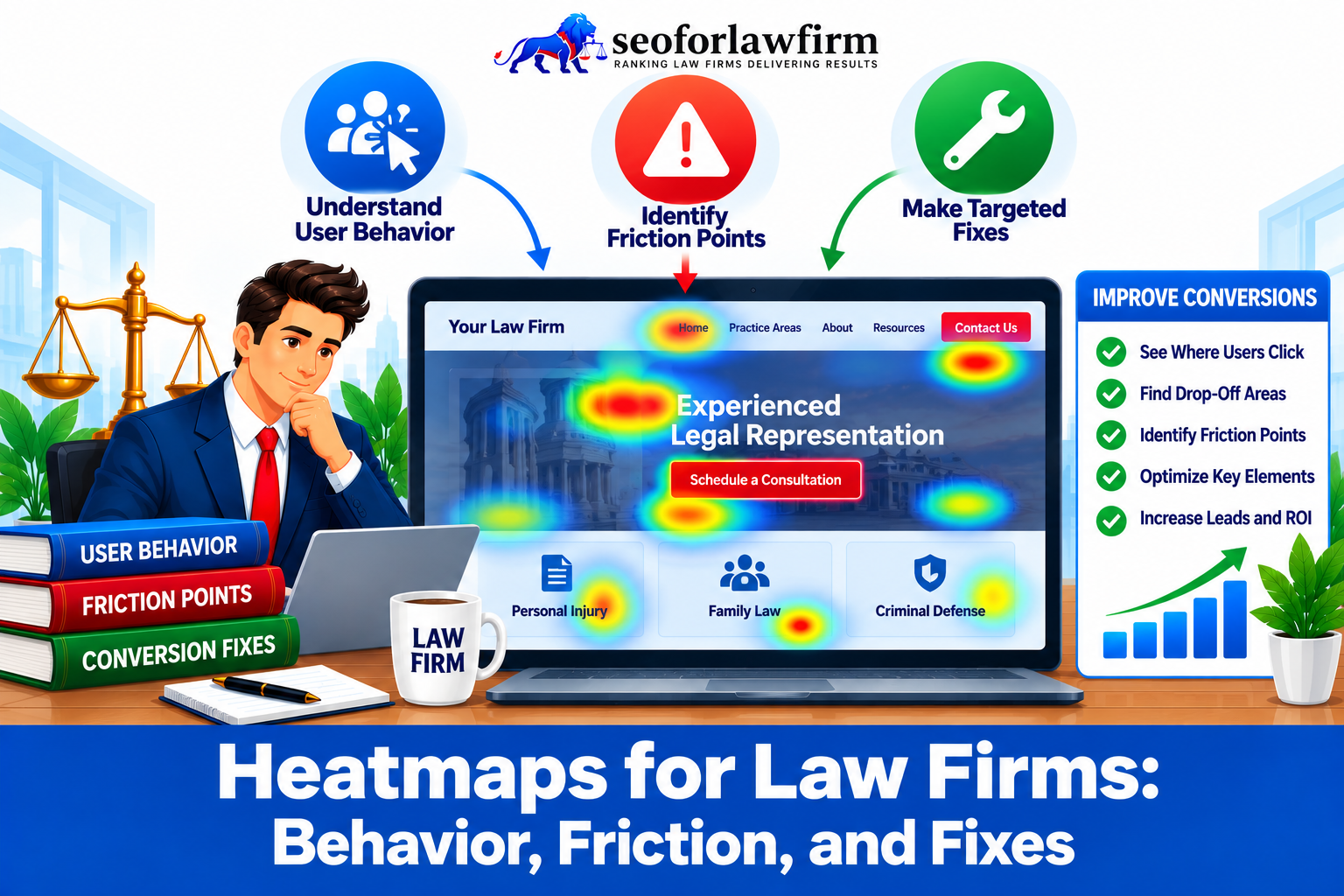
Heatmaps for law firms are visual analytics tools that reveal how users interact with a firm’s website, tracking where visitors click, scroll, and engage. This data helps firms understand user behavior, identify friction points, and implement design improvements that increase conversions.
Click heatmaps show which calls-to-action (CTAs), menu items, or links draw the most engagement, while scroll heatmaps show how far visitors read before exiting. By interpreting these insights, law firms will detect weak engagement zones, optimize key buttons, and restructure content for improved usability.
A 2016 study by Anastasia Berezhnaya, “Conversion Rate Optimization: Visual Neuro Programming Principles,” demonstrated that combining A/B testing with neuro-visual design principles enhances conversion accuracy and layout effectiveness. Heatmaps complement A/B testing by revealing visual interaction patterns, while A/B tests validate these findings with measurable results.
Law firms use heatmap data to refine CTA placement, adjust navigation, and enhance page layouts for stronger client engagement. Click maps expose underperforming elements or ignored sections that need redesign. However, heatmaps don’t explain why users behave a certain way, making supplemental analytics tools essential for context.
The most popular heatmap tools include Hotjar, Crazy Egg, and Microsoft Clarity, which offer both free and advanced plans. While Google Analytics doesn’t provide native heatmaps, it integrates seamlessly with these platforms, giving law firms a complete view of user engagement, conversion friction, and performance improvement opportunities.
Table of Contents
- Article sections will appear here.
What Are Heatmaps on Law Firm Websites?
Heatmaps on law firm websites are visual analytics tools that track how users interact with different page elements, such as clicks, scroll depth, and mouse movements. They provide a color-coded overview showing which areas attract the most attention and which are ignored.
In legal marketing, heatmaps help firms understand how visitors navigate practice area pages, menus, and calls-to-action (CTAs). By revealing where engagement occurs or drops off, firms can identify layout weaknesses, improve user experience, and refine website design to increase lead generation and client intake efficiency.
How Can Law Firms Use Heatmaps Effectively?
Law firms can use heatmaps effectively by installing tracking software, analyzing key engagement patterns, and using those insights to guide design and conversion improvements. Heatmaps visually represent where visitors click, scroll, or interact most, allowing firms to refine layout, content flow, and calls-to-action for higher engagement.
Listed below are the 6 Steps to Use Heatmaps on Law Firm Websites.
- Install heatmap software: Use tools such as Hotjar, Crazy Egg, or Microsoft Clarity to record user behavior.
- Select key pages: Focus on high-value areas like the homepage, practice area pages, and contact or consultation forms.
- Analyze click heatmaps: Identify which buttons, CTAs, and navigation links attract attention and which are ignored.
- Review scroll heatmaps: Measure how far users scroll down each page to find where engagement drops off.
- Refine design and layout: Adjust CTA placement, simplify menus, or restructure content to reduce friction and improve flow.
- Compare engagement over time: Track progress by reviewing updated heatmaps and analyzing how changes affect conversions.
Using this data-driven process, law firms will continuously improve usability, optimize client pathways, and strengthen their website’s lead generation performance.
When Should Law Firms Use Heatmaps on Their Websites?
Law firms should use heatmaps when they want to understand how visitors actually interact with key pages, especially practice-area, landing, and intake pages, to identify friction points that affect engagement, conversions, and lead quality.
Listed below are the 3 key situations when law firms should use heatmaps on their websites.
- During redesigns: Heatmaps identify which navigation elements, CTAs, and content sections attract engagement or get ignored, helping teams refine layouts before launch.
- On landing pages: They reveal how visitors interact with copy, videos, and contact buttons, showing where users lose interest or fail to convert.
- For intake forms: Heatmaps pinpoint friction points where users abandon submissions, allowing firms to simplify form design and reduce drop-offs.
By using heatmaps at these key stages, law firms gain actionable insights that lead to improved usability, stronger engagement, and higher lead conversion rates.
How Do Click Heatmaps Help Law Firms Analyze User Behavior?
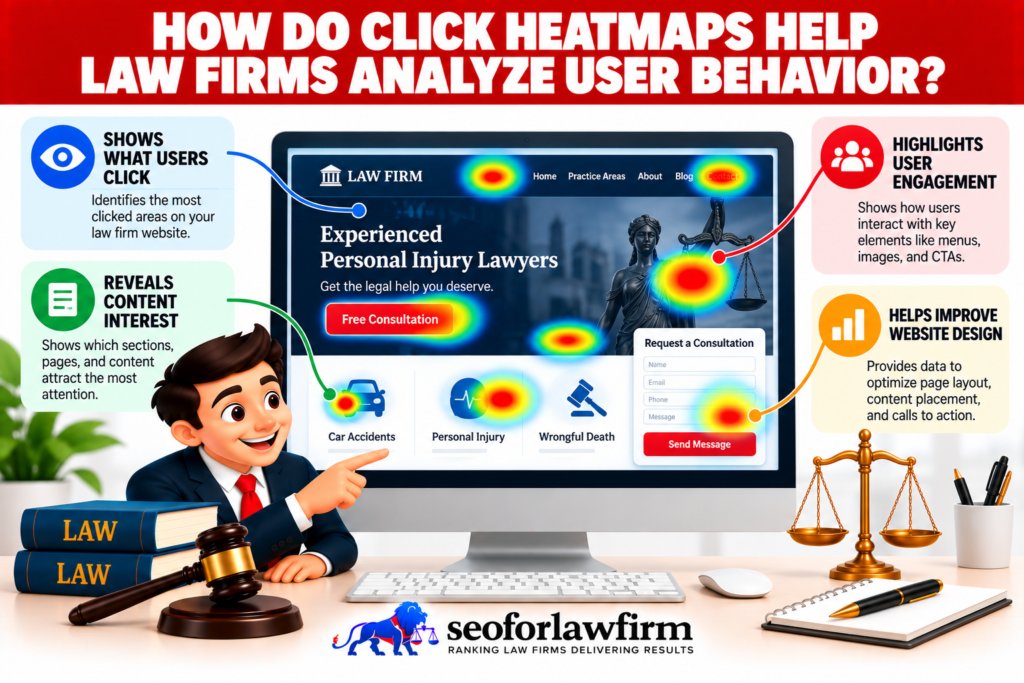
Click heatmaps help law firms analyze user behavior by visually showing which parts of a webpage attract clicks and which are ignored. This insight allows firms to see how visitors interact with calls-to-action (CTAs), navigation menus, and practice area links, offering a clear picture of engagement patterns.
By using this data, law firms can reposition or redesign CTAs for stronger conversions, simplify navigation for easier access to key information, and remove or update underperforming elements. Law firm web design uses those behavior patterns to improve page hierarchy, navigation, contact visibility, and intake pathways instead of changing layouts based on appearance alone.
How Do Scroll Heatmaps Measure Visitor Engagement on Law Firm Websites?
Scroll heatmaps measure visitor engagement by showing how far users scroll down a webpage and where they stop reading or exit. This visualization helps law firms understand whether their content length supports user interest or causes early drop-offs, as well as whether calls-to-action (CTAs) are positioned in areas visitors actually see.
A 2017 study by Grusky et al., “Modeling Sub-Document Attention Using Viewport Time,” which analyzed over 1.2 million web reading sessions, found that user attention is heavily concentrated near the top of the page. These findings state the importance of structuring key information and CTAs higher up on the page. Scroll heatmaps, therefore, guide firms in optimizing content hierarchy, enhancing readability, and improving conversion performance through strategic layout placement.
How Do Heatmaps Reveal User Behavior Patterns on Law Firm Websites?
Heatmaps reveal user behavior patterns on law firm websites by visually mapping where visitors click, scroll, hover, and pause, allowing firms to see how real users interact with pages instead of relying only on analytics numbers. Click heatmaps show which calls-to-action, links, and buttons attract attention, or get ignored, helping firms evaluate whether “Call Now,” intake forms, or chat features are placed and worded effectively.
Scroll maps reveal how far users read before dropping off, stating whether key information and CTAs appear too low on the page or whether long legal explanations cause disengagement. Movement and attention maps indicate areas where users linger or hesitate, signaling confusion, trust gaps, or unmet intent. By acting on these insights, law firms will refine page layout, simplify messaging, reposition trust signals, and create clearer conversion paths that better match client intent.
UX studies in service-based industries show that websites using heatmap-driven design changes commonly see conversion rate improvements of 20–30%, demonstrating how visual behavior insights directly translate into higher engagement and lead generation.
How Do Heatmaps Support A/B Testing for Law Firm Websites?
Heatmaps support A/B testing for law firm websites by visually illustrating how users interact with different design variations, such as headlines, CTAs, layouts, and intake forms. They reveal engagement zones in each version of a page, showing where visitors click, scroll, or lose interest.
By combining this visual data with A/B testing metrics, law firms can confirm whether design adjustments genuinely improve performance. Law firm landing-page optimization uses that evidence to test headlines, CTA placement, form length, trust signals, and page structure against actual conversion outcomes rather than assumptions.
Do A/B Tests Enhance the Value of Heatmap Analysis for Law Firms?
Yes, A/B tests enhance the value of heatmap analysis by turning visual interaction data into measurable performance insights. While heatmaps show where users click, scroll, or disengage, A/B tests determine how those behavioral differences affect key metrics like conversion rates or lead form submissions.
This combination allows law firms to validate qualitative findings, such as which CTAs or layouts draw the most attention, with quantitative results that confirm whether those design changes actually improve performance. The synergy between A/B testing and heatmaps makes marketing decisions more accurate, evidence-based, and conversion-focused, ensuring website improvements are backed by both behavioral and statistical data.
How Can Law Firms Use Heatmap Data to Increase Conversions?
Law firms can use heatmap data to increase conversions by analyzing where visitors click, scroll, and drop off, then refining their website design to eliminate friction and guide users toward action. Many firms achieve this by boosting conversion rates through visual behavior insights, which help identify weak engagement areas and optimize user flow.
Heatmaps reveal whether calls-to-action (CTAs) are positioned effectively, whether intake forms cause abandonment, and how well navigation helps visitors find key information. By using this data, firms will reposition CTAs for higher visibility, simplify form steps, and improve content layout, all of which enhance engagement and raise the likelihood of client inquiries.
How Do Click Heatmaps Help Identify Underperforming Website Elements?
Click heatmaps help identify underperforming website elements by showing which areas receive little to no user interaction. These visual insights reveal ignored links, low-engagement buttons, or inactive content blocks, allowing law firms to pinpoint where users lose interest or fail to take the intended action.
By analyzing these interaction gaps, firms will reposition calls-to-action, redesign or state neglected buttons, and remove distracting or irrelevant elements. Using click heatmap data, law firms create a more intuitive layout that encourages exploration, improves engagement, and increases conversion opportunities across key pages.
What Types of Friction Do Heatmaps Commonly Uncover on Law Firm Pages?
Heatmaps commonly uncover friction on law firm pages by revealing where users hesitate, ignore key elements, abandon forms, or miss calls-to-action due to poor layout, unclear messaging, slow interactions, or mobile usability issues.
Listed below are the 6 Common Website Heatmap Insights.
- Ignored or missed calls-to-action (CTAs): Heatmaps show low click activity on “Call Now,” “Free Consultation,” or form buttons when CTAs are poorly placed, visually weak, or buried below the fold, causing high-intent visitors to leave without converting.
- Scroll drop-off zones: Scroll maps frequently reveal that users abandon pages before reaching critical trust signals, FAQs, or contact options, indicating that key conversion elements appear too late or the opening content fails to hold attention.
- Confusing navigation elements: Excessive clicking or cursor hovering on menus, tabs, or links signals user uncertainty, caused by unclear labels, overloaded menus, or non-intuitive information architecture.
- Form friction and abandonment points: Heatmaps state fields where users hesitate, rage-click, or abandon forms entirely, commonly due to excessive required fields, unclear questions, or lack of reassurance around privacy and next steps.
- Mobile usability issues: On mobile devices, heatmaps expose mis-taps, repeated clicks, or ignored elements caused by small buttons, cramped layouts, sticky overlays, or hidden CTAs that frustrate users.
- Content overload or visual clutter: Attention heatmaps show engagement dropping sharply in areas with dense legal text, long paragraphs, or competing elements, signaling cognitive overload that discourages further interaction.
Left unresolved, these friction points reduce engagement, increase bounce rates, and suppress lead generation, even when traffic quality is high. Conversion optimization studies across service-based websites consistently show that reducing UX friction identified through heatmaps will increase form completions and lead conversions by 20–35%, demonstrating the direct impact of friction removal on measurable ROI.
What Are the Limitations of Using Heatmaps for Legal Website Optimization?
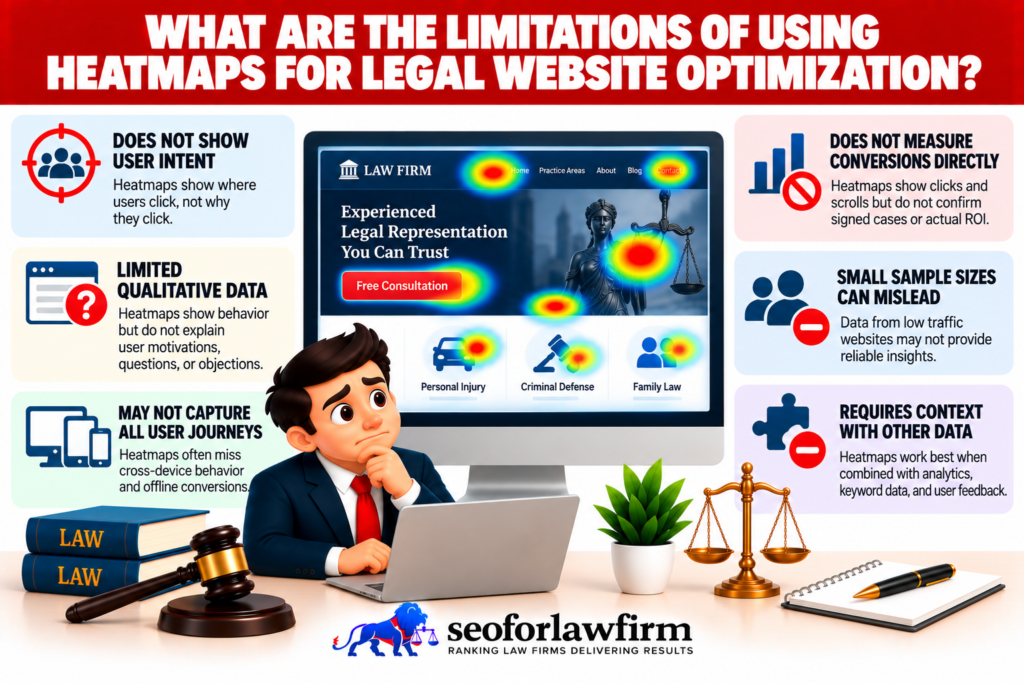
The limitation of using heatmaps for legal website optimization is that they show where users click, scroll, or hover but do not explain why users behave that way. Heatmap patterns can therefore be misinterpreted without broader analytics, conversion data, and user research.
Listed below are the 5 Limitations of Heatmaps in Legal Website Optimization.
- Lack of demographic data: Heatmaps don’t identify visitor types, such as location, device, or client intent.
- No intent tracking: They reveal behavior but not motivation, offering no insight into why users click or abandon pages.
- Small sample bias: Limited traffic will distort results and reduce the accuracy of engagement analysis.
- Surface-level insights: Heatmaps show patterns visually but lack performance data like conversion rates or time-on-page.
- No real-time tracking: They don’t monitor live user behavior, delaying insights into sudden performance changes.
Law firms need to combine heatmaps with Google Analytics for lawyers, CRM data, conversion tracking, and session recordings because visual click or scroll patterns alone do not show traffic source, user intent, lead quality, or signed-client outcomes.
How Can Law Firms Interpret Heatmap Data Effectively?
Law firms can interpret heatmap data effectively by analyzing engagement patterns, identifying weak interaction areas, and comparing user behavior with conversion goals. The goal is to understand how visitors navigate the site and where friction occurs so that design and content will be optimized for better results.
Listed below are the 5 Steps to Interpret Heatmap Data.
- Identify engagement hotspots: Look for areas with high interaction, such as calls-to-action, navigation links, or contact buttons.
- Analyze low-activity zones: Detect sections with minimal clicks or scroll depth to locate design or content issues.
- Compare user flow with conversion paths: Ensure visitors are following the intended journey toward forms, consultations, or contact pages.
- Prioritize improvements: Focus on optimizing underperforming elements while reinforcing high-engagement areas.
- Validate through A/B testing: Test layout or CTA changes to confirm that updates lead to measurable conversion improvements.
By interpreting heatmap data this way, law firms gain actionable insights that support data-driven website optimization and higher client conversion rates.
What Is the Best Heatmap Software for Law Firm Websites?
The best heatmap software for law firm websites provides detailed visual insights into user behavior, helping firms identify engagement patterns, optimize layouts, and improve conversions. Each platform offers unique features suited for analyzing how visitors interact with practice area pages, contact forms, and navigation elements.
Listed below are the 5 Best Heatmap Tools for Law Firm Websites.
- Hotjar: Offers click, scroll, and movement heatmaps along with session recordings and feedback surveys.
- Crazy Egg: Provides detailed visual reports, A/B testing tools, and easy setup for optimizing page performance.
- Microsoft Clarity: A free option that includes heatmaps, session replays, and behavior analytics without traffic limits.
- Lucky Orange: Delivers dynamic heatmaps, conversion funnel tracking, and real-time visitor analytics.
- Smartlook: Combines user journey tracking, event analytics, and heatmaps for deeper behavioral insights.
These tools help law firms identify friction points, refine call-to-action placement, and improve user experience, making them essential for conversion-driven website optimization.
Does Google Analytics Include a Heatmap Feature?
No, Google Analytics does not include a built-in heatmap feature. It focuses on tracking quantitative data such as sessions, conversions, user flow, and traffic sources, but it does not visualize user interactions like clicks or scroll depth.
To access heatmap insights, law firms will integrate Google Analytics with third-party platforms such as Hotjar, Crazy Egg, or Microsoft Clarity. These tools complement GA by providing visual behavior data, allowing firms to see where visitors engage while still using GA to measure how that engagement impacts conversions and ROI.
This integration offers a complete performance view, combining behavioral heatmap insights with analytics-driven marketing metrics for smarter website optimization.
Are Heatmaps Free for Law Firms to Use?
Yes, some heatmap tools are free to use, while others offer limited free versions alongside paid subscriptions. Microsoft Clarity provides a completely free plan with unlimited session tracking and heatmaps, making it an excellent option for law firms starting. Tools like Hotjar and Crazy Egg also offer free tiers but restrict the number of recorded sessions, reports, or data storage duration.
Free versions are ideal for smaller websites, but premium plans unlock advanced features such as A/B testing integration, conversion funnel tracking, and real-time analytics, valuable for firms seeking deeper insights.
A 2020 study by Ilan Kirsh, “Using Mouse Movement Heatmaps to Visualize User Attention to Words,” confirmed that heatmaps are widely used to analyze and visualize user attention through mouse movements and clicks, reinforcing their importance in UX optimization and website performance analysis.
How Can Law Firms Turn Heatmap Insights into Concrete UX and Conversion Fixes?
Law firms can turn heatmap insights into concrete UX and conversion fixes by directly addressing problem areas, such as repositioning weak CTAs, simplifying navigation, reducing form friction, optimizing mobile layouts, and decluttering content, to guide users smoothly toward contacting or retaining the firm.
Listed Below Are the 8 Key Steps for Using Heatmap Insights.
- Identify high-friction zones using heatmaps: Review click, scroll, and attention heatmaps to pinpoint ignored CTAs, rage-click areas, hesitation zones, and scroll drop-off points that signal confusion or disengagement.
- Reposition or redesign calls-to-action (CTAs): Move CTAs into high-attention or high-click areas revealed by heatmaps, strengthen visual hierarchy (contrast, size, spacing), and clarify CTA language to align with user intent.
- Simplify page layouts in problem areas: Reduce visual clutter where heatmaps show excessive hovering or scattered clicks by removing distractions, tightening copy, and prioritizing one primary action per section.
- Optimize forms at abandonment points: Shorten forms by removing non-essential fields, clarify labels, add reassurance messaging (privacy, next steps), and reposition forms where users naturally pause or engage.
- Fix mobile UX issues revealed by heatmaps: Address mis-taps, cramped buttons, hidden CTAs, sticky overlays, and spacing issues that appear in mobile heatmaps to improve tap accuracy and flow.
- Strengthen internal linking and visual cues: Add buttons, directional cues, trust badges, or inline links in high-attention zones to guide users smoothly toward consultations or contact pages.
- A/B test UX changes before full rollout: Test revised layouts, CTA placements, form versions, or messaging against the original to confirm that heatmap-informed changes improve engagement and conversion rates.
- Monitor post-change performance continuously: Re-run heatmaps and compare conversion metrics (calls, forms, bookings) to validate that fixes reduced friction and increased lead generation over time.
Industry CRO benchmarks consistently show that UX improvements driven by heatmap analysis increase conversion rates on service-based websites by 20–40%, confirming that behavior-led design changes deliver measurable gains rather than cosmetic improvements.