

Google Analytics 4 (GA4) for lawyers tracks how prospective clients find a law firm, what actions they take on the firm’s website, where they leave the intake funnel, and which marketing channels generate leads. Law firms use GA4 to connect website behavior with measurable client-acquisition activity rather than relying only on pageviews or traffic totals. According to a study by Randall A. Lewis and Justin M. Rao titled The Unfavorable Economics of Measuring the Returns to Advertising in 2015, Lewis and Rao examined 25 field experiments and found substantial uncertainty in advertising ROI estimates. A precise dashboard number does not by itself establish causation.
GA4 events track actions such as form submissions, click-to-call interactions, email clicks, live-chat engagement, consultation bookings, and resource downloads. Law firms can mark business-important actions as key events and use those events to evaluate which pages, campaigns, and traffic sources contribute to legal inquiries.
Law firms need to track the complete client journey from initial search to signed case because website analytics alone stop before qualification, consultation, engagement, and collected revenue. GA4 therefore needs to connect with intake, CRM, case-management, and financial systems when the firm wants to measure business outcomes rather than website activity alone.
Funnel explorations show how visitors move from a landing page through engagement, inquiry, consultation, and other measurable stages. GA4 website data does not establish the full financial return from legal marketing on its own. Law firms strengthen attribution by connecting GA4 with call tracking, intake software, CRM records, case-management systems, and collected revenue data.
This creates a measurable acquisition path from Traffic Source → Website Visit → Lead → Consultation → Signed Case → Revenue. Google Analytics uses an event-based measurement model in which important actions become key events, while advertising-related key events can become Google Ads conversions. Google describes this measurement sequence as Event → Key Event → Conversion.
Table of Contents
- Article sections will appear here.
What Does Google Analytics Do for Law Firms?
Google Analytics helps law firms identify where prospective clients come from, how they interact with legal content, and which website actions lead to inquiries and consultations. GA4 compares traffic from organic search, Google Ads, Google Business Profile, legal directories, referrals, email, social media, and other campaigns while showing which practice-area or location pages attract visitors and which actions occur before contact.
GA4 acquisition and event data answer where the visitor came from, which page attracted the visitor, and what the visitor did on the website, while call-tracking, intake, CRM, case-management, and financial systems determine whether that visitor became a qualified lead, retained client, or revenue-generating matter. Law firms strengthen attribution by combining GA4 with call tracking and analytics for law firms, allowing telephone and website inquiries to enter the same marketing-performance framework and connect traffic sources with consultations, signed cases, and revenue.
How Do Events Function in Google Analytics for Law Firms?
GA4 events function by recording specific actions users take on a law firm website, such as page views, form interactions, phone clicks, downloads, chat activity, and consultation bookings. GA4 uses an event-based measurement model that allows law firms to distinguish passive website visits from actions that show stronger client intent. These events also help firms measure how prospective clients progress from viewing legal content to contacting or hiring the firm.
Listed below are the 4 main GA4 event categories.
- Automatically collected events: GA4 records these events without additional setup.
- Enhanced Measurement events: GA4 tracks supported interactions such as scrolling, outbound clicks, site search, video engagement, file downloads, and some form activity when Enhanced Measurement is enabled.
- Recommended events: Google defines these events for common business actions and reporting use cases.
- Custom events: Law firms create custom events for actions that require firm-specific measurement, such as phone clicks, chat starts, or consultation bookings.
Which GA4 Events Should Lawyers Track?
Lawyers should track GA4 events for page engagement, contact actions, lead generation, consultation bookings, and retained clients. Lower-intent events show how users interact with legal content, while higher-intent events measure actions that move prospective clients closer to contacting or hiring the law firm.
The table below shows the primary GA4 events law firms must track.
| User Action | Suggested Event | Client-Intent Level |
| Practice-area page viewed | page_view | Low |
| Scroll engagement | scroll or custom-depth event | Low |
| Legal guide downloaded | file_download | Low–Medium |
| Contact form started | form_start | Medium |
| Phone number clicked | click_to_call | Medium–High |
| Email link clicked | click_to_email | Medium–High |
| Live chat started | chat_start | Medium–High |
| Contact form submitted | form_submit | High |
| Legal lead generated | generate_lead | High |
| Consultation booked | consultation_booked | High |
| Client retained | CRM/offline retained-client event | Highest |
How Should Lawyers Track Form Submissions in GA4?
Lawyers should track form starts, successful form submissions, and generated leads as separate GA4 events so they can identify where prospective clients abandon the intake process. A useful sequence is Practice-Area Page → Form Start → Successful Submission → Lead Generated. If 1,000 users visit a personal injury page, 150 begin the form, and 60 submit it successfully, the form-start rate is 15%, and the form-completion rate is 40%, which means 60% of form starters did not complete the form.
Law firms must also separate technical form-submit triggers from genuine leads because Ajax forms, validation errors, embedded forms, custom forms, and external scheduling tools can produce inaccurate event data. The highest-value lead event must fire only after the inquiry successfully reaches the intake system.
Listed below are the 4 main form events law firms must track.
- Form start: Records when a prospective client begins the intake form.
- Successful form submission: Records when the form passes validation and submits successfully.
- Lead generated: Records when the completed inquiry reaches the firm’s intake system.
- Form abandonment: Identifies users who begin the form but leave before completing it.
How Should Law Firms Track Click-to-Call Actions?
Law firms should track telephone-link clicks in GA4 and use call-tracking or intake software to determine whether those clicks become connected calls, qualified leads, consultations, or signed clients. A tel: click shows contact intent but does not prove that the caller reached the firm or became a legitimate legal lead. GA4 measures the website interaction, while call-tracking and intake systems measure the downstream outcome. Counting every phone click as a qualified lead inflates conversion rates and understates actual acquisition costs.
Listed below is the 5-step click-to-call acquisition sequence.
- Phone click: The visitor selects the firm’s telephone link.
- Connected call: The call successfully reaches the firm.
- Qualified call: The caller meets the firm’s case and client criteria.
- Consultation: The qualified caller schedules or completes a consultation.
- Signed client: The caller retains the law firm.
How Should Lawyers Track Click-to-Email Events?
Lawyers should track click-to-email events in GA4 when email links form part of the firm’s client-intake process. A custom event such as click_to_email records when a visitor selects a mailto: link and therefore signals contact intent.
The click does not confirm that the visitor sent an email, qualified as a prospective client, or retained the firm, so law firms must keep click-to-email events separate from completed lead events.
Listed below are the 4 main distinctions law firms must maintain.
- Email link clicked: Shows contact intent.
- Email received: Confirms that the prospective client completed the contact action.
- Qualified lead: Confirms that the inquiry matches the firm’s criteria.
- Consultation or signed client: Measures the downstream business result.
How Should Law Firms Track Live Chat in GA4?
Law firms should track meaningful live-chat actions such as chat starts, qualified-lead creation, and consultation bookings rather than treating every chatbot interaction as a lead. A visitor who opens the chat widget and immediately exits represents a weaker signal than a visitor who completes intake questions, submits contact details, and requests an attorney consultation. GA4 event tracking must therefore reflect progression through the chat-intake process.
Listed below are 6 useful live-chat events.
- Chat opened: The visitor opens the chat interface.
- Chat started: The visitor begins an actual conversation.
- Contact details submitted: The visitor provides usable contact information.
- Lead qualified: The chat interaction produces a prospect who meets the firm’s criteria.
- Consultation scheduled: The prospect books an attorney consultation.
How Should Law Firms Track Resource Downloads?
Law firms should track legal-resource downloads as engagement events that show research interest rather than automatically classifying every download as a client conversion. Download activity helps law firms identify which informational assets attract prospective clients and which topics contribute to later inquiries when analytics, lead, and intake data remain connected. A resource download represents stronger engagement than a passive page view, but the event does not prove that the user became a qualified lead.
Listed below are 6 examples of legal resources law firms can track.
- Car accident checklists.
- Divorce preparation guides.
- Estate-planning worksheets.
- Workers’ compensation guides.
- Business-law checklists.
- Legal process PDFs.

What Funnels Should Law Firms Build in GA4?
Law firms should build GA4 funnels that track prospective clients from landing-page visits through engagement, consultation booking, and client retention. Funnel exploration helps analysts identify where users fail to progress through the acquisition path. A law firm can define sequential steps around website behavior and then connect later stages with intake or CRM data so the funnel extends beyond the initial website conversion.
Listed below are the 7 practical law firm GA4 funnel steps.
- Landing Page View: The user arrives on a practice-area or location page.
- Meaningful Engagement: The user reads or interacts with the page.
- CTA Interaction: The user clicks a consultation button, phone number, or intake form.
- Form Start: The user begins submitting contact information.
- Lead Generated: A form, call, or chat produces an actual inquiry.
- Consultation Booked: A qualified prospect schedules an attorney consultation.
- Client Retained: The CRM records a signed engagement.
What Does a Law Firm GA4 Funnel Reveal?
A law firm GA4 funnel reveals where prospective clients drop out between website acquisition, engagement, lead generation, consultation booking, and client retention. Each decline points to a different part of the acquisition system and helps the firm determine whether the problem originates in traffic quality, website experience, conversion design, form usability, intake, or client retention.
For example, a funnel with 1,000 practice-area page views, 600 engaged users, 180 CTA interactions, 120 form starts, 80 generated leads, 40 consultations, and 12 retained clients shows progressively smaller conversion pools at each stage.
Listed below are the 6 main funnel drop-offs and what they indicate.
- Landing page → Engagement: A sharp decline can indicate search-intent mismatch, weak content, poor traffic quality, or slow page performance.
- Engagement → CTA interaction: A large drop can indicate weak calls to action, poor CTA visibility, unclear positioning, or insufficient trust signals.
- CTA interaction → Form start: A decline can indicate unclear next steps, form accessibility problems, or weak intake design.
- Form start → Lead generated: A large drop can indicate technical errors, excessive fields, confusing questions, or form friction.
- Lead generated → Consultation booked: A sharp decline usually points to intake response, qualification, scheduling, or follow-up problems.
- Consultation booked → Client retained: A large drop can indicate consultation, pricing, qualification, or retention problems.
Which Google Analytics Reports Are Most Useful for Law Firms?
The most useful GA4 reports and exploration tools for law firms are Traffic acquisition, Landing pages, device reporting, geographic reporting, and Custom Explorations. These reports help law firms compare marketing channels, identify landing pages that generate inquiries, measure calls and form activity, locate funnel drop-offs, and understand how prospective clients navigate before or after important actions. GA4 Path exploration displays user journeys in a tree structure, while law firm marketing KPIs give those analytics a business context through qualified leads, acquisition costs, signed cases, and revenue.
The table below shows how law firms use the main GA4 reports and tools.
| GA4 Report or Tool | Law Firm Application |
| Traffic acquisition | Compares organic search, paid search, referrals, social, email, and campaigns |
| Landing pages | Identifies entry pages that generate legal inquiries |
| Events | Measures calls, forms, downloads, chats, and CTA interactions |
| Key events | Measures high-value actions connected to lead generation |
| Funnel exploration | Identifies where prospective clients leave the intake funnel |
| Path exploration | Shows what visitors do before or after important events |
| Device reporting | Compares mobile and desktop behavior and conversion performance |
| Geographic reporting | Measures demand across geographic markets within applicable privacy limits |
| Custom Explorations | Segments practice areas, channels, campaigns, devices, and user behavior |
How Do Lawyers Set Up Custom GA4 Reports?
Lawyers set up custom GA4 reports and Explorations by selecting dimensions, metrics, segments, and filters that answer a specific marketing question. A law firm does not need one report containing every available metric because focused reports provide clearer answers about practice-area performance, traffic-source quality, location demand, device behavior, form abandonment, campaign performance, and qualified lead generation. GA4 Explorations also support techniques such as funnel analysis, path analysis, segment overlap, cohort analysis, and free-form reporting.
Listed below are 7 useful questions custom GA4 reports must answer.
- Which practice-area pages generate the most leads?
- Which traffic sources produce the highest key-event rates?
- Which locations generate consultation requests?
- Do mobile visitors call more often than desktop visitors?
- Which landing pages produce the highest form abandonment?
- Which campaigns generate qualified leads?
- Which channels contribute to signed cases?
How Do Lawyers Track Traffic Sources in GA4?
Lawyers track traffic sources in GA4 through source, medium, campaign, and channel-group dimensions that identify where website visitors originated. These dimensions allow the firm to separate organic search, paid advertising, referrals, email, social media, directories, digital PR, and other acquisition sources. Accurate source attribution gives the firm the data needed to compare qualified leads, cost per lead, client acquisition cost, signed cases, and ROI by marketing channel.
Listed below are 10 common traffic sources law firms must distinguish in GA4.
- Organic Google search.
- Google Ads.
- Google Business Profile.
- Bing.
- Legal directories.
- Referral websites.
- Email newsletters.
- Social media.
- Digital PR.
- Sponsorships.
How Should Law Firms Use UTM Parameters?
Law firms should use standardized UTM parameters on manually tracked external links so GA4 identifies the source, medium, campaign, keyword, or creative responsible for each website visit. Consistent UTM naming prevents fragmented reporting and helps the firm compare campaign performance across channels.
For example, utm_source=facebook and utm_source=Facebook can appear as separate values because campaign parameters are case-sensitive. Law firms must also keep client names, matter details, and other personally identifiable information out of UTM parameters.
Listed below are the 5 main UTM parameters and common law firm use cases.
- utm_source: Identifies the platform, publisher, partner, or referring source.
- utm_medium: Identifies the marketing medium, such as email, paid social, referral, or sponsorship.
- utm_campaign: Identifies the specific campaign or promotion.
- utm_term: Records keyword or targeting information when relevant.
- utm_content: Distinguishes different links, ads, buttons, or creative variations.
Law firms commonly use UTM tracking for Google Business Profile links, email newsletters, social media campaigns, legal-directory advertising, sponsorship links, digital PR campaigns, partner campaigns, and offline campaigns that use trackable URLs or QR codes.
Can Google Analytics Measure ROI for Law Firms?
Yes, GA4 contributes to law firm ROI measurement, but GA4 alone does not calculate true marketing ROI because signed-client status and collected legal revenue usually exist in external systems. GA4 records acquisition sources, website visits, and conversion-related events, while the firm’s CRM or intake system records lead qualification, consultation status, retainer status, and matter opening. Case-management and financial systems then record case value, billed fees, collected fees, and client lifetime value. According to a study by Tom Blake, Chris Nosko, and Steven Tadelis titled Consumer Heterogeneity and Paid Search Effectiveness: A Large-Scale Field Experiment in 2015, the researchers found paid-search effects varied between new and frequent eBay users. Crediting every ad-linked conversion to advertising can overstate its incremental contribution.
Law firms therefore measure complete ROI by connecting Traffic Source → Website Activity → Lead → Consultation → Signed Client → Matter → Collected Revenue. The formula is Marketing ROI = (Attributed Revenue − Marketing Cost) ÷ Marketing Cost × 100. For example, a law firm that spends $25,000 on marketing and generates $100,000 in attributable collected revenue produces a 300% ROI, meaning the campaign generated $3 in return above the original marketing cost for every $1 invested.
Which Metrics Connect GA4 to Law Firm ROI?
The main metrics connecting GA4 activity to law firm ROI are source attribution, client acquisition cost, signed cases, attributed revenue, and marketing ROI.
| Metric | What It Measures | Formula or Source |
| Traffic source/medium | Origin of website users | GA4 |
| Leads | Prospective-client inquiries | GA4 + intake |
| Qualified leads | Inquiries meeting case criteria | CRM/intake |
| Cost Per Lead | Cost to generate an inquiry | Marketing Cost ÷ Leads |
| Cost Per Qualified Lead | Cost to generate an eligible prospect | Marketing Cost ÷ Qualified Leads |
| Cost Per Consultation | Cost to produce a booked consultation | Marketing Cost ÷ Consultations |
| CAC / Cost Per Signed Case | Cost to retain one client | Acquisition Cost ÷ Signed Clients |
| Attributed Revenue | Revenue connected to a marketing source | CRM + case management |
| Marketing ROI | Profitability of marketing | (Revenue − Cost) ÷ Cost × 100 |
Tracking these metrics prevents a firm from treating traffic or form submissions as the final measure of marketing success.
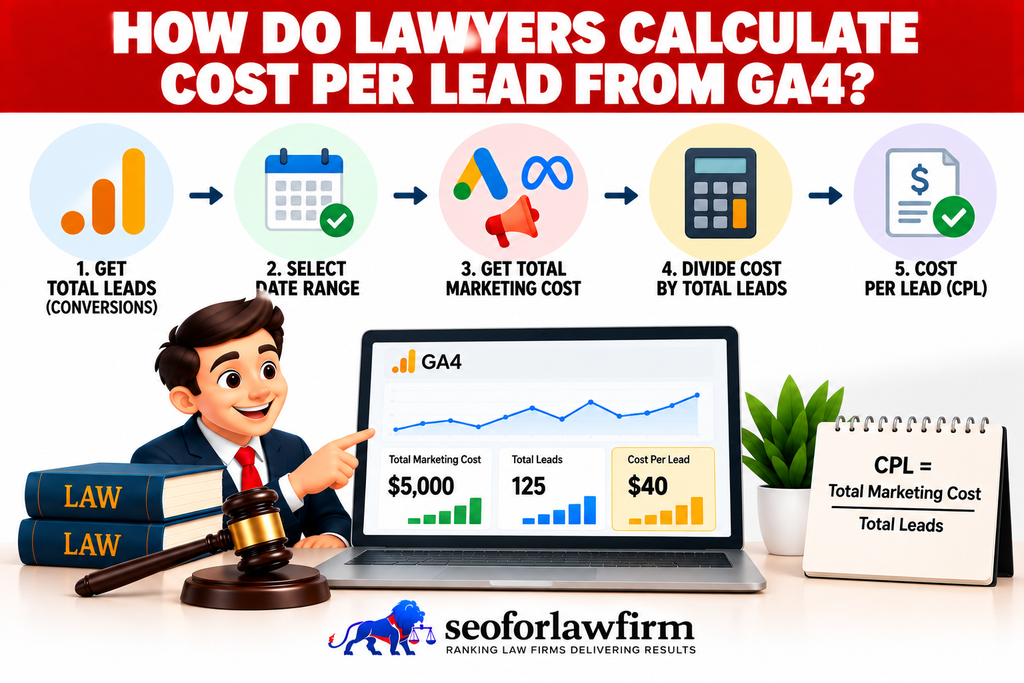
How Do Lawyers Calculate Cost Per Lead From GA4?
Lawyers calculate cost per lead from GA4 by dividing marketing spend by the number of legitimate leads generated by the corresponding campaign or channel. The formula is CPL = Marketing Spend ÷ Leads. If Google Ads costs $12,000 and generates 80 legitimate inquiries, the CPL is $150.
GA4 lead events provide the initial digital lead count, while CRM-qualified lead data produces a more accurate denominator by excluding spam, vendors, job applications, duplicate submissions, existing clients, and matters outside the firm’s practice criteria.
Listed below are the 3 main data points needed to calculate CPL.
- Marketing spend: The amount invested in the campaign or channel.
- GA4 lead events: The initial number of website-generated inquiries.
- Qualified lead data: CRM data that removes invalid or unsuitable inquiries.
- Final CPL: Marketing spend divided by the verified lead count.
How Do Lawyers Calculate Client Acquisition Cost?
Lawyers calculate client acquisition cost by dividing total acquisition expenditure by the number of new paying clients generated during the same reporting period. The formula is CAC = Acquisition Cost ÷ New Clients. If a campaign costs $30,000 and generates 10 retained clients, the CAC is $3,000 per client. CAC provides a stronger business measure than CPL because the denominator represents actual clients rather than initial inquiries.
Listed below are the 3 main components of CAC.
- Acquisition expenditure: Marketing, advertising, agency, software, and other attributable acquisition costs.
- New clients: Prospects who retained the law firm during the measurement period.
- CAC calculation: Total acquisition expenditure divided by new clients acquired.
How Does CRM Data Connect With Google Analytics?
CRM data connects GA4 acquisition data with qualified leads, consultations, signed clients, matters, case values, and revenue. The closed-loop measurement sequence is GA4 Visit → Lead → Qualified Lead → Consultation → Signed Client → Matter → Revenue. According to a study by Hongshuang (Alice) Li and P. K. Kannan titled Attributing Conversions in a Multichannel Online Marketing Environment: An Empirical Model and a Field Experiment in 2014, Li and Kannan found channel contributions differed from conventional attribution metrics. Recording a conversion source and establishing incremental marketing impact are different tasks. With appropriate data controls, legal CRM and intake integration connects permitted website events with qualification and engagement stages held in the firm’s intake system.
The source, medium, campaign, and other acquisition details must remain attached to the lead throughout intake so a prospect originating from Google / organic does not later become a generic website lead inside the CRM. Preserving original attribution allows the firm to calculate channel-level signed cases, acquisition costs, and ROI.
Listed below are the 7 main CRM connections law firms must maintain.
- Original source and medium: Preserves where the prospect first came from.
- Campaign data: Connects the lead with the relevant marketing campaign.
- Lead qualification: Records whether the inquiry meets the firm’s criteria.
- Consultation status: Tracks booking and attendance.
- Signed-client status: Records successful retention.
- Matter data: Connects the client with the opened legal matter.
- Revenue data: Connects acquisition activity with financial outcomes.
How Do Law Firms Connect GA4 Leads to Signed Cases?
Law firms connect GA4 leads to signed cases by preserving acquisition data throughout the intake, CRM, retainer, and case-management process. The connection allows the firm to determine which marketing sources produce clients rather than merely inquiries. Source, medium, campaign, landing page, and relevant identifiers must remain attached to each lead as the prospect progresses through qualification, consultation, retention, matter opening, and revenue collection.
Listed below are the 8 stages Law firms use to connect GA4 leads to signed cases.
- Capture acquisition data: Record source, medium, campaign, landing page, and relevant identifiers.
- Create the lead: Send the inquiry into the intake system or CRM.
- Preserve original attribution: Keep the initial acquisition source attached to the lead.
- Record qualification: Mark the lead as qualified or disqualified.
- Record consultation activity: Track consultation booking and attendance.
- Record signed-client status: Identify whether the prospect retained the firm.
- Attach matter and revenue data: Connect the signed client with the legal matter and collected revenue.
- Report by source: Measure signed cases and revenue according to the initial marketing source.
How Does GA4 Help Lawyers Identify Funnel Leaks?
GA4 helps lawyers identify funnel leaks by showing where users stop progressing between acquisition, engagement, contact, and conversion stages. Different drop-offs point to different problems, which prevents firms from blaming website performance when the loss actually occurs during intake, qualification, scheduling, or retention. Observed drop-offs between relevant landing pages and inquiry completion provide testable priorities for conversion rate optimization for law firms.
Listed below are 5 common funnel-leak patterns.
- High traffic + low engagement: Indicates possible search-intent mismatch, weak content, slow performance, or poor traffic quality.
- Strong engagement + low CTA interaction: Indicates weak positioning, poor CTA visibility, insufficient trust signals, or weak client-focused messaging.
- High form starts + low submissions: Indicates excessive fields, confusing questions, technical errors, or form friction.
- Strong lead generation + low consultation rate: Indicates intake, qualification, follow-up, or scheduling problems.
- Strong consultations + weak signed-case rate: Indicates a retention or consultation-stage problem rather than a website problem.
How Should Law Firms Segment GA4 Data by Practice Area?
Law firms should segment GA4 data by practice area because lead quality, conversion rates, acquisition costs, case values, and revenue differ between legal services. A practice area generating more leads does not automatically generate more profit because profitability depends on qualification rates, signed-case rates, acquisition costs, and case economics. Multi-office firms must also segment performance by location so each market can be evaluated separately.
Listed below are 8 common practice-area segments.
- Personal injury.
- Family law.
- Criminal defense.
- Estate planning.
- Immigration.
- Employment law.
- Bankruptcy.
- Business law.
Law firms must compare each segment using.
- Qualified lead rate.
- Consultation rate.
- Signed-case rate.
- Acquisition cost.
- Average case value.
- Attributed revenue.
What Are the Advantages of GA4 for Law Firms?
GA4 gives law firms an event-based measurement system for connecting traffic sources, website behavior, lead activity, and intake journeys. The platform helps firms analyze how prospective clients arrive, which actions they take, where conversion paths break down, and which marketing sources contribute to leads when GA4 is connected with downstream systems.
Listed below are the 12 main advantages of GA4 for law firms.
- Event-based tracking.
- Traffic-source attribution.
- Funnel exploration.
- Path analysis.
- Custom reporting.
- Google Ads integration.
- Device segmentation.
- Landing-page analysis.
- Key-event reporting.
- CRM-supported attribution.
- Marketing ROI analysis when connected with downstream systems.
- Real-time reporting and DebugView for event validation.
What Challenges Do Law Firms Face When Setting Up GA4?
Law firms face GA4 setup challenges involving event configuration, cross-domain measurement, lead validation, CRM integration, attribution, and privacy. Poor implementation can create duplicate events, lost source data, inflated lead counts, broken sessions, and incomplete conversion reporting. A written measurement plan must define each event, parameter, key event, acquisition convention, funnel stage, and CRM status before reporting begins.
Listed below are 11 common GA4 implementation problems.
- Incomplete event configuration.
- Duplicate event firing.
- Forms hosted on external platforms.
- Appointment tools breaking sessions.
- Phone calls occurring outside website tracking.
- CRM source fields being overwritten.
- Lead spam inflating conversion counts.
- Inconsistent UTM naming.
- Missing Google Ads integration.
- Incomplete consent implementation.
- Client information leaking into analytics parameters.
What Privacy Rules Apply to GA4 for Law Firms?
Law firms must prevent personally identifiable information and confidential client information from being transmitted to Google Analytics. GA4 must measure marketing and conversion actions without receiving the substance of a legal matter.
Client names, email addresses, personal phone numbers, Social Security numbers, medical information, case descriptions, criminal allegations, consultation details, and detailed intake answers must remain outside analytics parameters, URLs, campaign values, and custom dimensions.
Listed below are 9 examples of information law firms must not send to GA4.
- Client names.
- Email addresses.
- Personal phone numbers.
- Social Security numbers.
- Medical information.
- Full case descriptions.
- Criminal allegations.
- Confidential consultation details.
- Detailed intake answers.
A safe event is generate_lead, while an event parameter containing the prospective client’s detailed legal or medical issue is inappropriate.

What Are the Most Common GA4 Setup Mistakes Law Firms Make?
The most common GA4 setup mistakes law firms make are tracking website activity without validating genuine leads, preserving attribution, or connecting analytics with signed-client outcomes. These mistakes inflate conversion reporting, hide funnel problems, and make weak campaigns appear more effective than they are.
Listed below arethe 10 most common GA4 setup mistakes law firms make.
- Tracking pageviews but not calls, forms, chats, or bookings.
- Counting every form_submit event as a qualified legal lead.
- Treating phone-number clicks as completed calls.
- Marking too many low-value actions as key events.
- Using outdated Universal Analytics terminology and workflows.
- Failing to measure form abandonment.
- Losing attribution across scheduling or intake domains.
- Using inconsistent UTM naming.
- Reporting traffic instead of qualified leads and signed cases.
- Failing to connect CRM and revenue data with acquisition sources.
How Do Lawyers Verify GA4 Tracking?
Lawyers verify GA4 tracking by testing important user actions and confirming the results through Realtime reports, DebugView, and the firm’s actual intake records. Verification ensures that forms, calls, email links, chats, schedulers, downloads, campaign URLs, and CRM integrations record the correct events without duplication or lost attribution. Tracking must also be retested after website, form, CRM, call-tracking, consent, or Tag Manager changes.
Listed below are the 13 main actions law firms must test.
- Contact forms.
- Case-evaluation forms.
- Mobile phone clicks.
- Desktop telephone links.
- Email links.
- Live chat.
- Consultation schedulers.
- PDF downloads.
- Thank-you pages.
- Third-party intake forms.
- UTM-tagged campaign URLs.
- Google Ads auto-tagging.
- CRM lead creation.
What Should a Law Firm GA4 Dashboard Track?
A law firm GA4 dashboard should track acquisition, lead generation, attributable revenue, and marketing ROI rather than traffic alone. The dashboard must connect each marketing source with the prospective clients and financial outcomes it produces. Source and medium data show where visitors originate, landing pages show where prospective clients enter, form and phone events measure contact intent, and lead events measure initial inquiries. A useful dashboard connects website activity with law firm marketing KPIs, while keeping traffic, qualified inquiries, signed cases, and collected revenue distinct.
Qualified leads, consultation bookings, and signed cases extend reporting beyond website activity into intake and retention. CPL and CAC measure acquisition efficiency, while attributable revenue and marketing ROI show whether each channel produces profitable legal matters. The reporting structure must allow a law firm partner to move from a channel such as organic search or Google Ads directly to its leads, retained matters, revenue, and acquisition cost.
The table below shows the main KPIs a law firm GA4 dashboard must track.
| KPI | Purpose |
| Users by source/medium | Shows acquisition volume by marketing source |
| Landing pages | Shows where prospective clients enter the website |
| Form starts | Measures intake interest |
| Form completion rate | Measures form efficiency and abandonment |
| Phone clicks | Measures telephone contact intent |
| Lead events | Measures online inquiries |
| Key-event rate | Measures high-value website actions |
| Consultation bookings | Measures deeper intake progression |
| Qualified leads | Measures lead quality |
| Signed cases | Measures retained-client acquisition |
| CPL | Measures lead-generation efficiency |
| CAC | Measures the cost of acquiring retained clients |
| Attributed revenue | Measures revenue connected to marketing sources |
| Marketing ROI | Measures campaign profitability |