
A law firm technical SEO audit is a structured review of the website infrastructure that controls how search engines crawl, render, index, and interpret attorney pages. The audit identifies technical barriers affecting practice-area pages, attorney profiles, location pages, and legal resources. Crawlability controls discovery.
Indexing controls whether eligible pages appear in Search. Robots.txt manages crawler access. Noindex directives control index eligibility. XML sitemaps identify preferred URLs. Canonical tags clarify preferred page versions. Redirects guide users and crawlers between changed URLs. Server responses reveal broken pages and technical failures. JavaScript rendering determines whether search engines can access dynamically loaded content. Internal links connect important pages. Orphan pages weaken discoverability. Site architecture organizes legal content into clear relationships.
Core Web Vitals measure loading, responsiveness, and visual stability through Largest Contentful Paint, Interaction to Next Paint, and Cumulative Layout Shift. Good performance targets LCP within 2.5 seconds, INP below 200 milliseconds, and CLS below 0.1. According to Google/SOASTA research titled Mobile Page Speed: New Industry Benchmarks in 2017, the probability of a mobile visitor bouncing increased by 32% when load time rose from 1 second to 3 seconds and by 90% when it rose from 1 second to 5 seconds. Mobile rendering matters because Google primarily uses mobile content for indexing and ranking, so important legal content, metadata, structured data, navigation, forms, links, and calls to action should remain accessible on smaller screens.
HTTPS protects data in transit. Valid certificates and consistent HTTP-to-HTTPS redirects prevent duplicate protocol versions and conflicting canonical signals. Structured data describes entities and page relationships. Organization, LocalBusiness, LegalService, Breadcrumb, Article, and other relevant schema types can support clearer interpretation when they match visible content. Schema does not create a guaranteed ranking boost or rich result. A complete law firm technical SEO audit therefore reviews crawlability and indexing, site architecture and internal links, canonicalization and duplicate URLs, redirects and broken URLs, Core Web Vitals and site speed, mobile rendering and responsiveness, HTTPS and security configuration, and structured data validation
Table of Contents
- Article sections will appear here.
What Is a Law Firm Technical SEO Audit?
A law firm technical SEO audit is a structured review of the website systems that control crawling, rendering, indexing, canonicalization, page speed, mobile accessibility, security, and structured data. The audit checks whether search engines can discover important URLs. Search engines need to access page resources. Search engines need to render content. Search engines need to follow internal links. Search engines need to understand canonical relationships.
Search engines need to index the intended pages. Search engines need to interpret structured information. Search engines need to serve the appropriate pages in Search. Technical SEO evaluates whether search engines can reliably access and process a page. Content SEO evaluates whether the page satisfies search intent and provides enough useful information to compete. A technically sound page can still perform poorly when the content is weak. A strong legal page can also remain invisible when technical barriers prevent Google from crawling, rendering, or indexing it correctly.
Why Is a Technical SEO Audit Important for Law Firm Websites?
A technical SEO audit is important for law firm websites because technical errors can prevent valuable legal pages from being crawled, indexed, consolidated, rendered, or served correctly in search results.
Law firm websites often contain:
- Practice-area pages
- Attorney biographies
- Location pages
- Blog articles
- Case-result pages
- Legal guides
- Intake pages
- Contact pages
Technical errors affecting these pages can include:
- Accidental noindex tags
- Robots.txt blocks
- Canonical conflicts
- Redirect loops
- Broken internal links
- 5xx server errors
- Duplicate URLs
- JavaScript rendering failures
- Slow primary content
- Missing mobile content
- Invalid structured data
A technical audit identifies those problems before the firm assumes a ranking decline is caused by content, links, or an algorithm update.
What Should a Law Firm Technical SEO Audit Check First?
A law firm technical SEO audit should first check indexability, crawlability, server responses, canonical signals, internal links, performance, mobile rendering, and structured data because these elements determine whether search engines can reliably process important legal pages. The audit should prioritize issues according to search impact. A blocked or deindexed practice-area page requires faster action than a minor warning that does not affect crawling, indexing, or Search eligibility.
Listed below are the 8 priority checks.
- Indexability: Confirm that priority practice-area pages, attorney profiles, location pages, and other important URLs are eligible for indexing. Review noindex directives, canonical conflicts, and excluded pages in Google Search Console.
- Crawlability: Confirm that Googlebot can access important URLs, internal links, scripts, stylesheets, images, and other resources required to render the page correctly.
- HTTP Status Codes: Identify 404 errors, 5xx server errors, redirect chains, redirect loops, and incorrect status responses. Priority URLs should return the intended response without unnecessary redirect steps.
- Canonical Signals: Confirm that duplicate and alternate URLs consistently point toward the intended canonical page. Internal links, redirects, sitemaps, and canonical tags should support the same preferred URL.
- Internal Links: Ensure that priority pages receive crawlable internal links from relevant sections of the website. Important legal pages should not remain orphaned or buried several levels deep without a clear navigation path.
- Performance: Measure Largest Contentful Paint, Interaction to Next Paint, Cumulative Layout Shift, server response, image weight, script execution, and other resource-loading problems that affect important landing pages.
- Mobile Rendering: Confirm that legal content, navigation, internal links, forms, metadata, structured data, and calls to action remain available and usable on mobile devices.
- Structured Data: Validate relevant markup and confirm that it matches visible page content. Schema errors should be evaluated according to whether they affect entity accuracy, Search eligibility, or supported rich-result features.
These checks should not receive equal priority. An accidental noindex directive on a major personal injury page can remove the page from Search entirely, while a minor schema warning may have little or no effect on crawling, indexing, or rankings.
How Do You Perform a Law Firm Technical SEO Audit?
You can perform a law firm technical SEO audit by crawling the website, comparing crawl data with Google Search Console, checking indexing controls, reviewing canonical and redirect signals, testing performance, inspecting mobile rendering, validating structured data, and prioritizing fixes by search impact. The audit should identify problems that block discovery, crawling, rendering, indexing, or page interpretation. The process should connect each technical issue with the legal pages, traffic, and search visibility it affects.
Listed below are the 8 steps for performing a law firm technical SEO audit.
- Crawl the Website: Use Screaming Frog, Sitebulb, or another crawler to collect URLs, status codes, titles, canonicals, robots directives, internal links, and crawl depth. The crawl reveals technical patterns across practice-area pages, attorney profiles, location pages, and supporting resources.
- Compare With Google Search Console: Review Page Indexing, URL Inspection, Core Web Vitals, HTTPS information, and Search performance. Compare Google’s data with the crawler to identify pages that are missing, excluded, or processed differently.
- Check Robots and Indexing Directives: Review robots.txt, noindex directives, nofollow instructions, X-Robots-Tag headers, and protected content. Confirm that important legal pages remain crawlable and eligible for indexing.
- Audit Canonicals and Duplicate URLs: Check whether alternate URLs consistently reference the intended canonical page. Resolve conflicting signals created by parameters, duplicate paths, protocol variations, or inconsistent internal links.
- Review Redirects and Broken Links: Find dead internal links, redirect chains, redirect loops, and outdated destinations. Internal links should point directly to valid and relevant final URLs whenever possible.
- Test Site Speed and Core Web Vitals: Use PageSpeed Insights, Lighthouse, Search Console, and browser development tools to assess loading speed, responsiveness, and visual stability. Prioritize problems affecting important landing pages and real users.
- Test Mobile Rendering: Review important pages on mobile devices and inspect rendered content for missing text, navigation failures, broken forms, hidden links, or unusable calls to action. The mobile version should preserve the information and functionality needed by users and search engines.
- Validate Structured Data: Test Organization, LocalBusiness, LegalService, Breadcrumb, Article, and other relevant markup for technical validity and factual accuracy. The structured data should match visible page content and describe genuine entities and relationships.
Where Can Law Firms Get a Technical SEO Audit and Fix Service?
Law firms can get technical SEO audit and remediation services from specialized providers such as SEOforLawFirm.com, which offers law-firm-focused technical auditing, crawlability analysis, indexing diagnostics, site architecture review, performance optimization, and implementation support. A professional technical SEO service should identify the problem, show which URLs are affected, explain the search impact, assign priority, recommend the repair, identify who should implement it, and validate the result after deployment. The SEOforLawFirm technical SEO audit and fix service connects technical diagnosis with indexing, redirects, Core Web Vitals, mobile SEO, internal architecture, structured data, XML sitemaps, and ongoing search measurement.
The table below shows examples of providers offering law firm SEO or technical SEO services.
| Provider | Technical SEO Focus | Law Firm Relevance |
| SEOforLawFirm.com | Crawlability, indexing, site architecture, Core Web Vitals, mobile SEO, schema, redirects, and technical remediation | Focuses specifically on law firm SEO and connects technical fixes with legal search visibility and lead measurement |
| Rankings.io | Technical SEO, site audits, website performance, and search optimization | Provides SEO services primarily for law firms and competitive legal markets |
| Scorpion | Website performance, technical search factors, SEO monitoring, and digital marketing | Serves law firms through broader legal marketing and website optimization services |
Listed below are the main elements a law firm technical SEO audit and fix service should address.
- Crawlability: Confirm that search engines can reach important practice-area, attorney, and location pages.
- Indexing: Identify noindex directives, canonical conflicts, excluded URLs, and other problems that prevent intended pages from appearing in Search.
- Canonicals: Confirm that duplicate and alternate URLs consistently reference the correct preferred version.
- Redirects and Broken URLs: Repair 404 errors, redirect chains, redirect loops, and outdated internal destinations.
- Internal Architecture: Connect important legal pages through crawlable internal links and remove unnecessary crawl-depth barriers.
- Core Web Vitals: Diagnose Largest Contentful Paint, Interaction to Next Paint, Cumulative Layout Shift, and related performance problems.
- Mobile Rendering: Confirm that legal content, navigation, forms, internal links, and calls to action remain functional on mobile devices.
- HTTPS and Security: Verify certificates, HTTP-to-HTTPS redirects, mixed content, and consistent secure delivery.
- Structured Data: Validate Organization, LegalService, LocalBusiness, Article, Breadcrumb, and other relevant schema against visible page content.
- XML Sitemaps: Confirm that sitemaps contain current canonical URLs that the law firm genuinely wants indexed.
A technical SEO audit creates the technical foundation for search visibility. Relevant legal content creates topical relevance. Legitimate authority supports competition. The strongest service connects technical repairs with crawlability, indexing, user experience, qualified leads, and signed-client outcomes.
How Should Law Firms Audit Site Speed and Core Web Vitals?
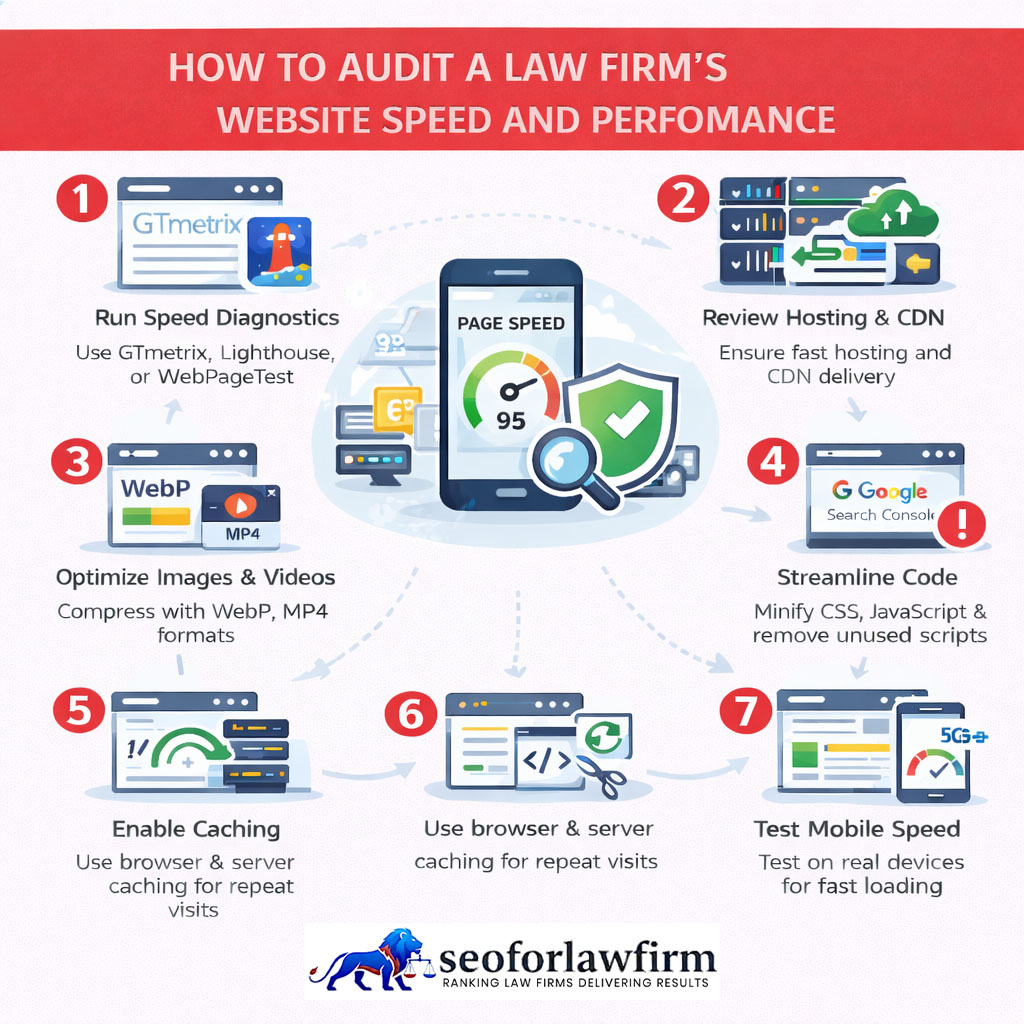
Law firms should audit site speed by comparing real-user field data with laboratory diagnostics, identifying the resources causing performance delays, and prioritizing improvements to Largest Contentful Paint, Interaction to Next Paint, and Cumulative Layout Shift. According to Google/SOASTA research titled Mobile Page Speed: New Industry Benchmarks, bounce probability increased 123% as mobile load time rose from 1 second to 10 seconds, showing why performance problems belong inside a technical SEO audit rather than being treated as purely visual issues. A complete law firm site-speed optimization process can address the technical problems identified during the audit.
The table below shows the current Core Web Vitals and Google’s recommended good-performance thresholds.
| Metric | Measures | Good Performance |
|---|---|---|
| Largest Contentful Paint (LCP) | Loading performance | ≤ 2.5 seconds |
| Interaction to Next Paint (INP) | Responsiveness | ≤ 200 milliseconds |
| Cumulative Layout Shift (CLS) | Visual stability | ≤ 0.1 |
A universal rule that every page must fully load within three seconds should not replace these measurements. LCP measures when the largest visible content element renders. INP measures responsiveness to user interactions. CLS measures unexpected visual movement. A page can continue downloading secondary resources after its primary visible content becomes usable.
Listed below are the main site-speed problems law firms should review during the audit.
- Oversized Hero Images: Large banner images can increase download and rendering time and delay LCP.
- Unoptimized Attorney Photographs: Large image files can increase page weight across attorney biographies, practice-area pages, and team sections.
- Excessive JavaScript: Heavy scripts can occupy the browser’s main thread and reduce responsiveness.
- Chat Widgets: Third-party chat tools can add scripts, network requests, and processing overhead.
- Review Widgets: External review feeds can introduce additional JavaScript, fonts, images, and network dependencies.
- Tracking Scripts: Multiple analytics, advertising, call-tracking, and session-recording scripts can increase processing and network activity.
- Slow Fonts: Unoptimized web fonts can delay text rendering and contribute to layout changes.
- Third-Party Maps: Interactive maps can add substantial JavaScript and external network requests.
- Video Embeds: Embedded videos can load scripts, thumbnails, players, and third-party resources before users interact with them.
- Poor Caching and Slow Hosting: Weak caching, slow server responses, and inefficient infrastructure can delay the delivery of page resources.
- Layout Shifts: Images without dimensions, dynamically inserted elements, fonts, embeds, and other unstable components can increase CLS.
How Should Law Firms Audit Crawlability?
Law firms should audit crawlability by confirming that search engines can reach important pages through crawlable links without being blocked by robots.txt, broken navigation, server errors, redirect problems, or inaccessible JavaScript. Google indexing for law firm websites depends on successful discovery and crawling before a page can become eligible for search results. Google discovers pages through internal links, sitemaps, previously known URLs, and other sources, so important practice-area pages, attorney profiles, and location pages need clear crawl paths.
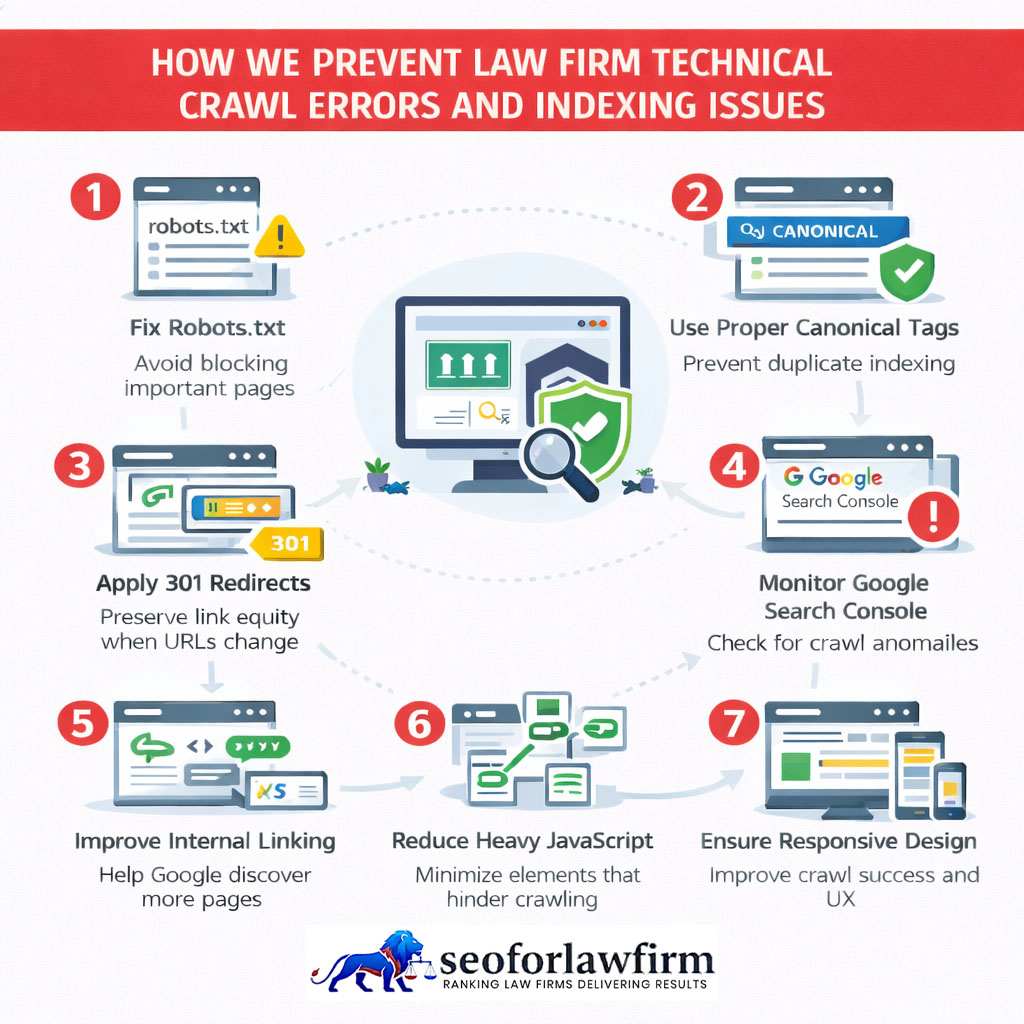
A technical crawl should identify orphan pages, broken internal links, excessive crawl depth, blocked URLs, redirect chains, redirect loops, 4xx responses, 5xx responses, JavaScript-dependent links, and unnecessary parameter URLs. Robots.txt controls crawler access. Robots.txt does not reliably remove a page from Google’s index. A publicly accessible page that should remain out of Search generally needs a noindex directive. Google still needs to crawl the page to read that noindex instruction. Crawlability controls access. Indexability controls whether the page is eligible to appear in Search.
How Do Indexing Problems Affect Law Firm Search Visibility?
Indexing problems affect law firm search visibility by preventing intended pages from becoming eligible to appear in Google Search or by causing Google to select a different URL as the canonical version. Accidental noindex directives can remove important legal pages from Search. Blocked resources can prevent Google from processing page content correctly. Duplicate URLs can divide signals across competing versions. Conflicting canonicals can point Google toward the wrong page. Soft 404s can cause weak or empty pages to be treated as missing. Server failures can interrupt crawling and indexing.
Weak internal discovery can leave practice-area, attorney, and location pages difficult to find. JavaScript rendering problems can hide important content or links. Low-value duplicate pages can create unnecessary indexation. Incorrect redirects can send crawlers away from the intended destination. Google Search Console can report statuses such as Crawled – currently not indexed, Discovered – currently not indexed, Duplicate without user-selected canonical, Alternate page with proper canonical, Excluded by noindex, Blocked by robots.txt, Not found, and Server error. These statuses do not require the same response. Alternate page with proper canonical can represent a correct setup. Excluded by noindex can also be intentional. The audit should compare the technical state with the law firm’s intended search strategy rather than trying to index every URL.
How Can Law Firms Fix Indexing Issues?
Law firms can fix indexing issues by identifying why an affected URL is excluded, correcting the underlying technical problem, improving legitimate internal discovery, and allowing Google to recrawl the corrected page. The fix should match the cause. A noindex problem requires an indexing change. A robots.txt problem requires crawl access. A canonical problem requires signal correction. A server or redirect problem requires URL-level repair. Internal links and XML sitemaps then help Google rediscover the intended page.
Listed below are the 7 main steps for fixing indexing issues.
- Inspect the URL in Search Console: Check the current indexing status, Google-selected canonical, last crawl information, and any reported exclusion reason. The diagnosis should come before the fix.
- Review Noindex Rules: Confirm that priority practice-area pages, attorney profiles, location pages, and other intended landing pages are not excluded accidentally.
- Check Robots.txt: Verify that important URLs and required page resources remain crawlable. A blocked page can prevent Google from seeing other indexing signals on that URL.
- Review Canonicals: Confirm that each important page references the intended canonical destination. Canonical tags, redirects, internal links, and sitemap entries should support the same preferred URL.
- Check HTTP Status Codes: Resolve unintended redirects, 404 errors, soft 404s, and 5xx server failures. Important indexable pages should return the correct final status.
- Improve Internal Linking: Link priority pages from relevant crawlable pages so search engines can discover and understand their relationship to the rest of the site.
- Update the XML Sitemap: Include current canonical URLs that the firm genuinely wants indexed. Remove obsolete, redirected, blocked, duplicate, or noindex URLs.
An official documentation guide by Google Search Central, titled “Learn About Sitemaps” in 2025, confirmed that while an XML sitemap helps Google discover preferred URLs on a website, it does not guarantee indexing or improve rankings by itself, as Google’s automated systems evaluate content quality and technical accessibility independently before deciding to include a page in search results.
How Should Law Firms Audit Canonical Tags?
Law firms should audit canonical tags by confirming that each indexable page consistently signals the intended representative URL without conflicting directives, sitemap entries, redirects, or internal links.
Canonicalization becomes important when multiple URLs contain the same or very similar content.
Examples include:
- HTTP and HTTPS versions
- www and non-www versions
- URLs with tracking parameters
- Print versions
- Duplicate category URLs
- Separate mobile and desktop URLs
- CMS-generated duplicates
A canonical tag is a strong hint, not an absolute command.
Google can choose a different canonical when other technical or content signals conflict.
Law firms should therefore align:
Canonical tag
Internal links
XML sitemap
Redirects
HTTPS preference
toward the same preferred URL.
Robots.txt should not be used as a canonicalization method.
How Should Law Firms Audit XML Sitemaps?
Law firms should audit XML sitemaps by confirming that they contain current, canonical, indexable URLs and exclude redirected, broken, duplicated, or deliberately non-indexable pages.
A clean law firm sitemap should generally contain:
- Canonical practice-area pages
- Attorney pages
- Genuine location pages
- Important informational content
- Other pages intended for Search
The sitemap should not become a repository for every URL generated by the CMS.
Common sitemap problems include:
- 404 URLs
- Redirected URLs
- noindex URLs
- Duplicate URLs
- Noncanonical URLs
- Staging URLs
- Old HTTP URLs
A sitemap helps discovery.
It does not force Google to index a page.
How Should Law Firms Audit Internal Links?
Law firms should audit internal links by confirming that important practice-area, attorney, location, and supporting pages receive crawlable contextual links from relevant pages across the website. A 2015 study by Ashwin Paranjape, Robert West, Leila Zia, and Jure Leskovec titled Improving Website Hyperlink Structure Using Server Logs found that user-behavior data could identify useful link additions that improve website navigation and connectivity. Internal-link audits therefore need to evaluate both crawl paths and whether the links help users move between related legal topics.
Internal links help search engines:
- Discover pages
- Understand site structure
- Identify relationships between topics
- Navigate between related URLs
A technical audit should identify:
- Orphan pages
- Broken internal links
- Redirected internal links
- Excessive crawl depth
- Unclear anchor text
- Important pages receiving very few internal links
Google recommends making links crawlable.
Important links should use normal HTML anchor elements with an href destination.
There is no documented Google rule requiring every page to remain within exactly 3 clicks of the homepage.
Contextual internal links also need review because crawlability depends on important pages being connected through meaningful site relationships rather than isolated URLs.
How Do Broken Links Affect a Law Firm Technical SEO Audit?
Broken internal links affect a law firm technical SEO audit by sending users and crawlers toward unavailable URLs instead of the intended legal resource.
A 404 response is not automatically a Google penalty.
404s are normal when pages genuinely no longer exist.
The problem occurs when:
- Important pages are accidentally deleted.
- Navigation links lead to dead URLs.
- Valuable backlinks point toward unnecessary 404s.
- Internal links continue referencing old addresses.
- Users reach dead pages during the client journey.
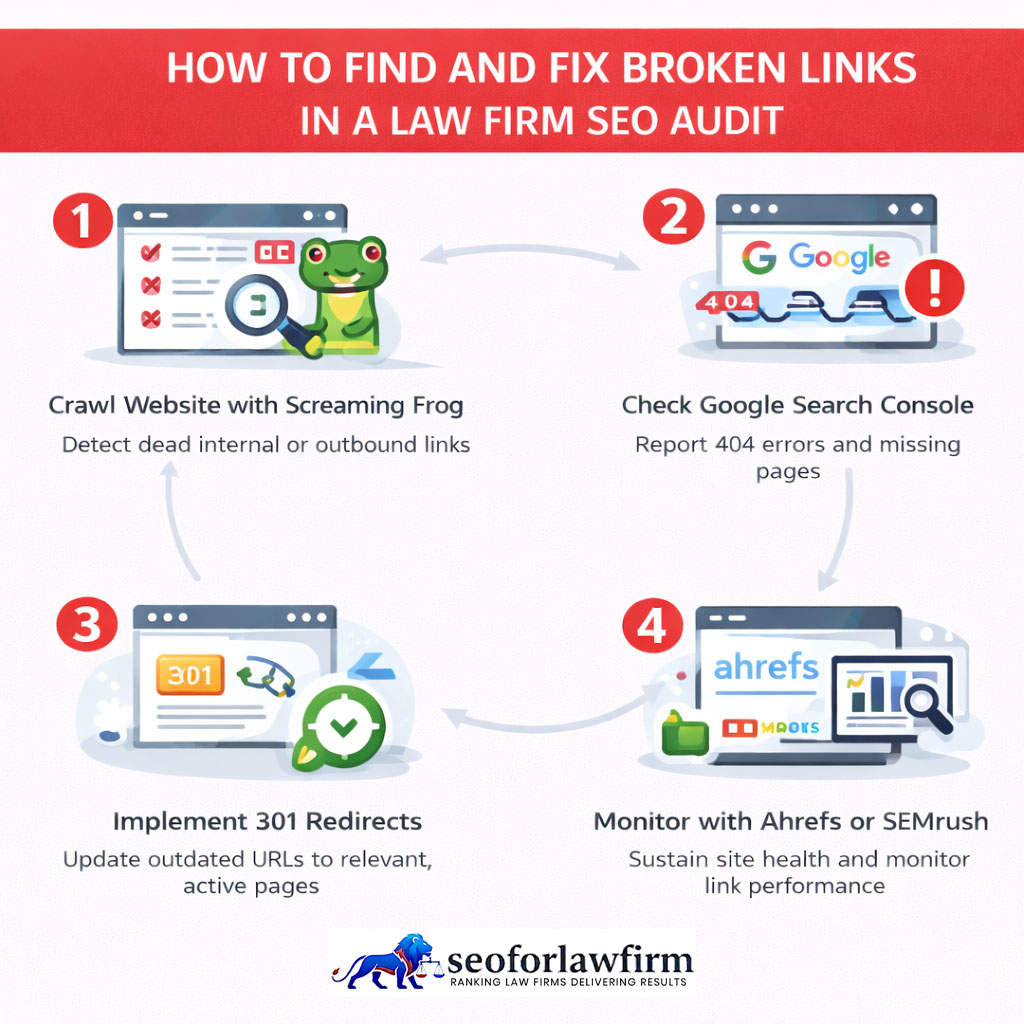
Listed below are the 4 main actions for fixing broken links.
- Update incorrect internal links to the current URL.
- Restore pages that were removed accidentally.
- Redirect genuinely replaced URLs to a relevant successor page.
- Allow permanently removed content to return 404 or 410 when no appropriate replacement exists.
Do not redirect every deleted page to the homepage.
Broken internal links require repair because they interrupt user navigation and can remove crawl paths to important legal pages.
How Should Law Firms Audit Redirects?
Law firms should audit redirects by confirming that retired or changed URLs point directly to the most relevant replacement without unnecessary chains, loops, or unrelated destinations.
Common redirect problems include:
Old URL → Older URL → Current URL
instead of:
Old URL → Current URL
Redirect chains create additional requests and make website maintenance harder.
Redirect loops create more serious failures because neither users nor crawlers reach the intended destination.
Permanent migrations should generally use server-side permanent redirects where appropriate.
Redirects should also align with canonical tags and internal links.
How Should Law Firms Check Mobile SEO Readiness?
Law firms should check mobile SEO readiness by testing responsive layouts, mobile rendering, content parity, Core Web Vitals, navigation, forms, and contact actions across actual smartphones and browser environments.
Google primarily uses mobile page content for indexing and ranking.
A mobile technical audit should therefore confirm that:
- Primary legal content remains present.
- Important internal links remain crawlable.
- Titles and metadata remain correct.
- Structured data remains available.
- Navigation works.
- Forms submit correctly.
- Telephone links work.
- Tables remain usable.
- Images do not overflow.
- Pop-ups do not obscure content.
The Google Mobile-Friendly Test and Search Console Mobile Usability report were retired in 2023.
Current mobile testing can use:
- Lighthouse
- PageSpeed Insights
- Chrome DevTools
- Search Console Core Web Vitals
- Real smartphones
- Cross-browser testing
Mobile testing also needs to confirm that important content, navigation, forms, and contact actions remain accessible on the version Google primarily indexes.
How Should Law Firms Audit HTTPS and Website Security?
Law firms should audit HTTPS by confirming that every public website page loads through a valid secure connection and that HTTP versions consistently redirect to the preferred HTTPS URLs.
The audit should review:
- SSL/TLS certificate validity
- Certificate expiration
- HTTP-to-HTTPS redirects
- Mixed-content warnings
- HTTPS canonical tags
- HTTPS sitemap URLs
- Internal HTTPS links
- Secure embedded resources
Google recommends HTTPS and generally prefers HTTPS over an equivalent HTTP page when choosing a canonical version, assuming the HTTPS implementation is valid.
HTTPS does not compensate for weak legal content or technical indexing problems.
It is part of a sound website configuration and secure user experience.
How Should Law Firms Audit Structured Data and Schema?
Law firms should audit structured data by confirming that schema accurately represents visible website entities, follows current specifications, and avoids unsupported or misleading properties. Accurate schema markup for law firms should reflect the entities and relationships already present on the page. Organization schema can describe the broader firm, LocalBusiness schema can describe a physical business location, and LegalService schema can describe a business providing legal services.
BreadcrumbList schema can describe navigational hierarchy. Article schema can describe qualifying editorial content. ProfilePage schema can describe appropriate profile pages. Schema.org defines LegalService as a subtype of LocalBusiness. Google recommends using the most specific LocalBusiness subtype that accurately represents the organization. Structured data helps machines interpret entities and relationships. Structured data can support eligible Search features. Not every Schema.org type produces a Google rich result. Schema also does not create an automatic ranking increase. The audit should confirm technical validity, factual accuracy, entity consistency, visible-content alignment, and eligibility for any Google Search feature the firm intends to support.
What Tools Are Used for Law Firm Technical SEO Audits?
The tools used for law firm technical SEO audits include Google Search Console, Screaming Frog, Sitebulb, PageSpeed Insights, Lighthouse, Chrome DevTools, Rich Results Test, and server-log or advanced crawling tools for deeper diagnosis. Each tool examines a different technical layer, while the wider set of law firm SEO tools also includes platforms for keyword research, local SEO, backlinks, analytics, and performance measurement.
Listed below are the 8 main tools used for law firm technical SEO audits.
- Google Search Console: Google Search Console reports indexing status, URL Inspection data, Core Web Vitals, HTTPS information, search performance, and manual actions. The platform shows how Google processes important law firm URLs.
- Screaming Frog: Screaming Frog crawls website URLs and collects status codes, internal links, canonicals, redirects, metadata, directives, and crawl-depth information. The crawl helps identify technical patterns across practice-area pages, attorney profiles, location pages, and resources.
- Sitebulb: Sitebulb performs technical crawls and visualizes architecture, internal linking, page relationships, and audit priorities. The platform helps organize large sets of technical findings into actionable issues.
- PageSpeed Insights: PageSpeed Insights measures Core Web Vitals and provides field data and laboratory diagnostics. The tool helps identify performance problems affecting important legal landing pages.
- Lighthouse: Lighthouse evaluates performance, accessibility, and other technical conditions in a controlled environment. The audit helps diagnose loading, rendering, and front-end implementation problems.
- Chrome DevTools: Chrome DevTools analyzes rendering, network requests, JavaScript execution, responsive layouts, and page performance. The tool helps diagnose technical problems directly within the browser.
- Rich Results Test: Rich Results Test evaluates structured data used for supported Google Search features. The test helps identify markup errors and determine whether eligible structured data is implemented correctly.
- Server Logs or Advanced Crawlers: Server logs and advanced crawling tools provide deeper information about crawler activity, server responses, crawl frequency, and technical behavior. These tools become useful when standard crawling and Search Console data do not fully explain a technical problem.
An official documentation guide by Google Search Central, titled “Overview of Google SEO Developer Tools” in 2025, confirmed that a comprehensive technical audit requires combining multiple diagnostic tools—such as Google Search Console for indexation data, Lighthouse for rendering performance, and the Schema Markup Validator for structured data—because no single platform captures every crawling, indexing, rendering, performance, and structured-data issue independently.
What Is the Difference Between Technical SEO and On-Page SEO for Lawyers?
Technical SEO focuses on whether search engines can access, render, index, and process law firm pages correctly, while on-page SEO focuses on the content and page elements used to satisfy search intent.
The table below shows the differences between technical SEO and on-page SEO.
| Technical SEO | On-Page SEO |
| Crawlability | Search intent |
| Indexing directives | Page content |
| Canonicals | Heading structure |
| Redirects | Titles |
| XML sitemaps | Meta descriptions |
| Core Web Vitals | Topic coverage |
| Mobile rendering | Content readability |
| HTTPS | Internal contextual relevance |
| JavaScript rendering | Keyword/entity usage |
| Structured data | Calls to action |
The 2 disciplines work together.
A technically inaccessible practice page cannot perform well regardless of content quality.
A technically perfect page with weak or irrelevant content also lacks a reason to rank.
Should Law Firms Audit Toxic Backlinks During a Technical SEO Audit?
No, law firms should not treat routine toxic-backlink classification as part of a technical SEO audit or automatically disavow links because a third-party SEO tool labels them toxic. Domain Authority, Domain Rating, Authority Score, Trust Flow, and proprietary toxicity scores are third-party measurements rather than Google metrics. A technical SEO audit can check Google Search Console for manual actions and review whether suspicious linking patterns require separate investigation.
Google identifies manipulative link practices as link spam and provides manual-action reporting when human reviewers determine that a site violates its spam policies. Search Console also reports only a sample of backlinks rather than a complete link inventory. Mass disavowal should not become a default technical-audit task. Backlink risk requires separate analysis of link origin, acquisition method, relevance, manipulation patterns, and any manual-action evidence before remedial action is considered.
How Often Should Law Firms Conduct a Technical SEO Audit?
Law firms should conduct a technical SEO audit after major website changes and at intervals based on website size, publishing activity, development frequency, and technical risk. A redesign can introduce crawl or indexing problems. A domain migration can change URL signals. A CMS migration can alter templates, canonicals, redirects, and metadata. An HTTPS migration can create protocol conflicts. Navigation changes and URL restructuring can affect internal links and crawl paths.
New JavaScript frameworks can change rendering behavior. Large content migrations, hosting changes, and significant Search Console indexing problems also justify a new audit. Routine monitoring should continue between full audits. A stable 50-page law firm website does not require the same audit frequency as a multi-location website publishing hundreds of URLs each month. Large or frequently changing websites can use a quarterly audit cycle. Smaller and more stable websites can use a 6–12 month cycle. Major technical changes or unexplained visibility losses justify an immediate audit. The audit schedule is an operational decision. It is not a Google ranking rule.
Where Can Law Firms Get a Technical SEO Audit and Fix Service?
Law firms can get technical SEO audit and remediation services from specialized legal SEO providers that understand crawling, indexing, website architecture, Core Web Vitals, mobile rendering, structured data, migrations, and Google Search Console diagnostics. A strong provider identifies the technical problem. The provider identifies the affected URLs. The provider explains the search impact. The provider assigns urgency. The provider recommends the fix. The provider defines who implements it. The provider then validates the repair. Technical remediation should confirm that priority pages remain crawlable, indexable, correctly canonicalized, securely delivered, mobile-friendly, and technically usable after implementation.
SEOforLawFirm.com is a law-firm-focused SEO provider that connects technical diagnosis with implementation and ongoing search measurement. Its technical SEO audit services for law firms address crawlability, indexing, site performance, mobile SEO, internal architecture, structured data, and other technical conditions that affect legal websites. Other legal SEO providers include Hennessey Digital, which offers law firm SEO and technical SEO consulting, and iLawyer Marketing, which includes technical SEO analysis within its law firm SEO services. A technical audit identifies infrastructure problems. Remediation corrects those problems. Crawlability, indexing, canonicals, redirects, internal links, Core Web Vitals, mobile rendering, HTTPS, JavaScript, XML sitemaps, and structured data form the technical framework. Strong technical health gives legal content a sound foundation for competing in Search.