

The best legal case management software for law firms in 2026 includes Clio, MyCase, PracticePanther, Filevine, and Smokeball. Clio is a strong choice for all-in-one practice management and integrations, MyCase serves solo and small to midsize law firms, PracticePanther focuses on workflow automation, Filevine supports litigation-heavy practices, and Smokeball specializes in automatic time tracking and document automation. The best platform depends on the firm’s size, practice area, caseload, budget, and accounting requirements. According to a study by Fred D. Davis titled Perceived Usefulness, Perceived Ease of Use, and User Acceptance of Information Technology in 1989, Davis linked perceived usefulness and ease of use with technology acceptance. Practical usability therefore deserves attention alongside features.
Clio combines matter management, calendaring, document storage, time tracking, billing, invoicing, and secure client communication. Clio Manage handles active matters, while Clio Grow supports lead tracking and client intake. Clio connects with Microsoft 365, QuickBooks, LawPay, and a broad ecosystem of third-party applications. Its published pricing starts at $49 per user per month, with additional features available in higher subscription tiers.
MyCase provides centralized case records, client messaging, 24/7 client portal access, automated intake forms, electronic signatures, document generation, and online payments. Its Basic plan starts at $50 per user per month with annual billing, while its Pro and Advanced plans include additional automation and document capabilities. PracticePanther supports customizable matter workflows, Gmail and Outlook synchronization, role-based permissions, legal billing, and electronic payments. PracticePanther’s published plans start at $49 per user per month.
Filevine specializes in complex litigation and high-volume plaintiff-side matters, including personal injury and mass tort cases. Its case management system provides customizable dashboards, medical record organization, treatment tracking, task automation, and litigation reporting. Related products include Lead Docket for intake and Vinesign for electronic signatures. Smokeball serves productivity-focused firms through automatic time capture, legal form templates, document assembly, and Microsoft Word and Outlook integration. Pricing for Filevine and Smokeball generally requires vendor-specific quotations.
Legal case management software also differs in accounting and client communication capabilities. CosmoLex and CARET Legal offer integrated legal accounting functions, while other systems connect with external accounting applications such as QuickBooks Online. Law firms should compare IOLTA trust accounting requirements, three-way reconciliation, document automation, mobile access, secure client portals, integrations, and reporting before purchasing.
Software availability and adoption vary across law firms, so firms need to evaluate whether a platform matches existing workflows, staffing, integrations, security requirements, and user capabilities before implementation.
Law firms selecting case management software should evaluate operational fit rather than platform popularity alone. Software choice forms part of broader law firm management because staffing, workflows, reporting, billing, and matter complexity determine which functions actually improve operations. A solo family law attorney may prioritize client communication and billing, while a personal injury firm handling hundreds of active claims may require medical chronologies, settlement tracking, and more extensive workflow configuration.
Listed below are 25 legal case management software platforms and related matter management systems for law firms in 2026.
- 1. Clio Manage: Clio Manage is cloud-based legal practice management software for organizing cases, contacts, calendars, documents, billing, and payments. Law firms use it to centralize daily matter management and administrative workflows.
- 2. MyCase: MyCase is a legal practice management platform that combines case management, client communication, billing, payments, documents, and scheduling. Law firms use it to manage client matters and routine firm operations from one system.
- 3. PracticePanther: PracticePanther is cloud-based law practice management software for matters, contacts, time tracking, billing, calendars, and documents. Lawyers use it to organize legal work and reduce manual administrative tasks.
- 4. Filevine: Filevine is a legal work platform designed for case management, document handling, communication, reporting, and workflow automation. Law firms use it heavily in litigation and other matter-intensive practices.
- 5. Smokeball: Smokeball combines practice management, document automation, time tracking, billing, and legal productivity tools. Small and midsize firms use it to manage matters and standardize recurring legal workflows.
- 6. CosmoLex: CosmoLex combines legal practice management with billing, accounting, trust accounting, and time tracking. Law firms use it to manage operational and financial workflows within one platform.
- 7. CARET Legal: CARET Legal provides legal practice management, billing, accounting, document management, and workflow tools. Law firms use it to coordinate matters, finances, and administrative operations.
- 8. Actionstep: Actionstep is a legal practice management platform with workflow automation, matter management, document management, billing, and CRM functionality. Firms use it to build structured processes around recurring legal and administrative tasks.
- 9. Rocket Matter: Rocket Matter provides cloud-based matter management, time tracking, billing, scheduling, payments, and productivity tools. Law firms use it to manage client work and financial activity in one environment.
- 10. Litify: Litify is a legal operating platform built on Salesforce for matter management, intake, documents, analytics, and workflow automation. Larger firms and legal organizations use it to coordinate complex legal operations and reporting.
- 11. CASEpeer: CASEpeer is practice management software designed primarily for personal injury law firms. It supports case tracking, settlement management, client communication, reporting, and team workflows.
- 12. Neos: Neos is a cloud-based legal case management platform from Assembly Software. Law firms use it for matter management, documents, communication, workflow automation, and reporting.
- 13. SmartAdvocate: SmartAdvocate is legal case management software focused on litigation and personal injury practices. Firms use it to manage case stages, documents, communications, deadlines, and operational reporting.
- 14. LEAP: LEAP combines legal practice management, document automation, legal forms, billing, and matter management. Small and midsize firms use it to organize legal work and automate recurring documents.
- 15. AbacusLaw: AbacusLaw is legal practice management software for case tracking, calendaring, contacts, documents, billing, and accounting-related workflows. Law firms use it to coordinate client matters and office administration.
- 16. CloudLex: CloudLex is a cloud-based legal practice platform designed primarily for plaintiff law firms. It supports matter management, intake, documents, communication, reporting, and litigation workflows.
- 17. Centerbase: Centerbase is cloud-based legal practice management software that combines matter management, billing, accounting, document management, and workflow automation. Law firms use it to connect legal operations with financial management.
- 18. MerusCase: MerusCase is cloud-based legal practice management software for matters, documents, billing, communication, and workflow automation. Firms use it to organize case information and standardize recurring processes.
- 19. Legal Files: Legal Files is legal case and matter management software for law firms, corporate legal departments, government agencies, and other legal teams. It helps users organize matters, documents, contacts, calendars, and reporting.
- 20. Lawcus: Lawcus is legal practice management and CRM software with workflow automation, intake, matter management, billing, and client communication features. Law firms use it to connect business development with ongoing matter management.
- 21. Tabs3: Tabs3 provides legal billing, accounting, practice management, and financial software for law firms. Firms use it to track time, generate invoices, manage trust accounts, and support back-office operations.
- 22. PCLaw: PCLaw combines legal practice management, billing, time tracking, accounting, and trust accounting. Small and midsize law firms use it to manage both client matters and firm finances.
- 23. ProLaw: ProLaw is legal practice management software that combines matter management, document management, billing, accounting, and reporting. Law firms use it to coordinate legal work with financial and administrative processes.
- 24. PerfectLaw: PerfectLaw provides legal practice management, billing, accounting, document management, and workflow functionality. Law firms use it to manage matters and back-office operations within an integrated system.
- 25. Lawmatics: Lawmatics is a legal CRM and client-intake platform focused on marketing automation, lead management, intake, scheduling, and follow-up. Law firms use it to manage prospective clients and improve the process from first enquiry to retained matter.
Table of Contents
- Article sections will appear here.
1. Clio Manage
Clio Manage is cloud-based legal case management software that helps law firms organize matters, contacts, deadlines, documents, time entries, billing, and payments in one system. The platform suits solo practices, growing firms, and multi-practice legal teams because it combines client records, calendars, task assignments, document storage, invoices, trust accounting, and payment collection with a broad integration ecosystem. Those functions support day-to-day law firm management by connecting matter work, staff responsibilities, billing, and client records inside one operational system.
Clio Grow extends the system with lead management, consultation scheduling, and client intake functions, while the Clio integration directory connects the platform with applications such as Microsoft 365, QuickBooks, and LawPay. Clio’s published starting price is $49 per user per month, with higher tiers and optional products increasing the total subscription cost.
2. MyCase
MyCase is legal case management software that helps solo, small, and midsize law firms centralize matter records, client communication, billing, payments, and document management. The platform combines client portals, secure messaging, legal calendars, document storage, invoicing, online payments, and matter tracking within one interface.
The Pro plan adds automated workflows, client intake forms, electronic signatures, document generation, and two-way texting for firms that need more structured intake and administrative automation. MyCase Basic starts at $50 per user per month when billed annually or $60 when billed monthly, while Pro costs $100 annually or $120 monthly and Advanced costs $130 annually or $150 monthly, stated as per-user monthly rates.
3. PracticePanther
PracticePanther is cloud-based legal practice management software that helps law firms configure matter workflows, automate recurring tasks, track billable time, and manage client payments. The platform suits firms that prioritize administrative automation because it combines matter management, task workflows, calendar synchronization, Gmail and Outlook integrations, secure client portals, and payment processing. Broader law firm marketing automation addresses a different layer of operations by automating lead follow-up, intake communication, and recurring marketing tasks outside the matter-management system.
Higher-tier plans add functions such as custom security roles, texting, document signatures, and integrated accounting. PracticePanther’s published rates are $49 for Solo, $69 for Essential, $89 for Business, and $114 for Business Pro per user per month.
4. Filevine
Filevine is legal case management software designed for litigation-heavy firms that need customizable workflows, detailed reporting, and extensive document tracking. The platform is particularly relevant to personal injury, mass tort, and other high-volume litigation practices because it organizes matters through configurable dashboards, tasks, document records, medical information, treatment histories, and reporting tools.
Lead Docket supports prospective-client intake, while Vinesign supports electronic signatures, and Filevine also provides AI-assisted capabilities for selected legal workflows. Filevine generally provides custom pricing based on firm size, selected products, and implementation requirements.
5. Smokeball
Smokeball is legal case management software that helps law firms automate time tracking, document production, billing, and productivity reporting. The platform integrates with Microsoft Word and Outlook, which supports firms that prepare large volumes of legal documents and correspondence.
Smokeball’s AutoTime functionality records eligible work activity and helps attorneys reconstruct billable time with less manual entry, while the broader platform also provides matter management, legal document templates, billing functions, and client communication tools. Smokeball uses plan-based pricing, and access to automatic time capture and advanced productivity features depends on the selected plan.
6. CosmoLex
CosmoLex is legal practice management software that combines matter management, legal billing, business accounting, and trust accounting in one platform. The system suits law firms that want connected financial and case records because it supports client trust ledgers, bank reconciliation, invoices, financial reports, documents, and matter organization.
CosmoLex’s built-in accounting functions make the platform relevant to firms that prefer to manage legal accounting without relying entirely on separate bookkeeping software. Firms should confirm current subscription rates and accounting configurations directly with CosmoLex.
7. CARET Legal
CARET Legal is a legal practice management platform that combines matter management, billing, financial administration, and document workflows. The platform is associated with the former Zola Suite product and supports firms that want to coordinate client information, case activity, administrative tasks, and financial records within a connected system.
Law firms should compare CARET Legal’s current product availability and accounting functions with their existing financial systems before selecting the platform. Firms should also confirm current plan availability and pricing directly with the provider.
8. Actionstep
Actionstep is legal practice management software that helps law firms configure matter workflows, automate documents, manage billing, and standardize recurring legal processes. The platform supports matter templates, task assignments, document handling, calendaring, and financial workflows, which makes it relevant to growing firms managing work across multiple teams or practice areas.
Actionstep’s configurable process structure allows firms to organize recurring legal activities around consistent stages, responsibilities, and operational rules. Actionstep pricing depends on firm size, selected products, required features, and implementation needs.
9. Rocket Matter
Rocket Matter is cloud-based legal practice management software that connects matter tracking, timekeeping, billing, payments, and financial reporting. The platform helps firms connect work performed on client matters with time entries, invoices, payment records, and productivity data.
Rocket Matter integrated time and billing functions make Rocket Matter suitable for firms that want matter management and financial tracking within the same operating system. Firms should confirm current subscription options and available financial features directly with Rocket Matter.
10. Litify
Litify is a Salesforce-based legal case management platform designed for law firms that need configurable workflows, centralized legal operations, and advanced reporting. The platform supports client intake, case management, document handling, task workflows, and performance monitoring within a system that can be configured around complex legal operations.
Litify’s Salesforce foundation makes Litify relevant to larger firms that require extensive customization, connected data, and enterprise-level reporting across departments or practice areas. Litify provides customized enterprise pricing based on configuration, implementation, and organizational requirements.
11. CASEpeer
CASEpeer is legal case management software designed for personal injury firms that manage medical treatment, insurance claims, settlements, and demand preparation. The platform organizes personal injury matters through treatment tracking, client communication, case stages, settlement information, and reporting.
CASEpeer connects case activity with the progression of a personal injury claim from intake through resolution. CASEpeer’s specialized workflow structure helps plaintiff-side teams monitor treatment status, settlement information, and assigned responsibilities. CASEpeer is most relevant to personal injury practices that want software built around the operational requirements of plaintiff litigation.
12. Neos
Neos is cloud-based legal case management software designed for personal injury practices and document-intensive litigation firms. The platform supports customizable matter workflows, document organization, task assignments, and structured case records.
Legal teams use Neos to coordinate intake, investigation, treatment monitoring, document activity, and settlement preparation. Neos workflow configuration helps firms assign responsibilities and track case progression across different stages. Neos is relevant to litigation teams that need centralized matter information and structured collaboration across high-volume cases.
13. SmartAdvocate
SmartAdvocate is legal case management software designed for personal injury, mass tort, and litigation practices that manage detailed case workflows. The platform supports intake pipelines, document management, task automation, reporting, and matter tracking.
SmartAdvocate helps legal teams organize claims through multiple stages while maintaining visibility into assigned tasks and case activity. Its reporting and workflow functions are particularly useful for firms handling large volumes of active matters. SmartAdvocate is most relevant to litigation practices that require structured processes across complex or high-volume caseloads.
14. LEAP
LEAP is cloud-based legal practice management software that combines matter management, document automation, time tracking, and billing. The platform provides legal document templates and connects matter information with recurring document-preparation workflows.
LEAP helps lawyers prepare forms, letters, agreements, and other standardized documents using information already stored in the matter record. Its integrated time and billing functions connect document-driven legal work with financial administration. LEAP is most relevant to firms where recurring document preparation represents a substantial part of daily legal work.
15. AbacusLaw
AbacusLaw is legal case management software that helps firms organize calendars, matters, documents, contacts, deadlines, and recurring workflows. The platform supports configurable case records, document templates, scheduling, and administrative processes.
AbacusLaw helps legal teams connect matter information with deadlines and recurring operational tasks. AbacusLaw’s customizable structure allows firms to adapt workflows around different practice areas and internal procedures. AbacusLaw is relevant to firms that need established practice management functions with configurable matter and calendar controls.
16. CloudLex
CloudLex is legal case management software designed for plaintiff-side personal injury firms that manage claims from intake through resolution. The platform supports medical record organization, case progression, settlement information, and team collaboration.
CloudLex connects legal and administrative activity with the stages of the personal injury claim lifecycle. Its workflow structure helps firms monitor treatment records, case status, settlement activity, and assigned responsibilities. CloudLex is most relevant to personal injury practices that need software centered on plaintiff-side case progression and medical documentation.
17. Centerbase
Centerbase is cloud-based legal practice management software that connects case management, billing, financial information, and configurable workflows. The platform supports matter records, legal accounting processes, client information, and operational reporting.
Centerbase allows firms to connect legal activity with billing and financial administration within a shared system. Its configurable workflows help teams standardize recurring administrative and matter-management processes. Centerbase is relevant to firms that need connected financial management and customizable operations across multiple practice areas.
18. MerusCase
MerusCase is cloud-based legal case management software that supports matter organization, document storage, task management, calendars, and workflow automation. The platform helps legal teams coordinate case activities, documents, assignments, and collaboration within one system.
MerusCase centralizes matter records so authorized users can review current information without relying on disconnected files or systems. Its cloud-based structure supports access to case information from different working locations. MerusCase is relevant to firms seeking centralized matter management and remote access to organized legal records.
19. Legal Files
Legal Files is legal matter management software designed for law firms, corporate legal departments, and government organizations that require structured records and reporting. The platform supports matter tracking, document management, calendaring, communication records, and task assignments.
Legal Files helps organizations centralize legal information across recurring administrative and matter-management processes. Its reporting functions support teams that need visibility into legal activity across multiple matters or departments. Legal Files is most relevant to organizations managing large volumes of legal records and repeatable operational workflows.
20. Lawcus
Lawcus is cloud-based legal practice management software that combines matter tracking, workflow automation, and client relationship management. The platform organizes matters through configurable pipelines, tasks, client records, and follow-up workflows.
Lawcus’s visual case-management structure helps firms monitor matter progression and assigned responsibilities from one interface. Lawcus also connects client relationship activity with ongoing legal and administrative workflows. Lawcus is relevant to firms that want visual pipeline management combined with workflow automation and client tracking.
21. Tabs3
Tabs3 is legal billing and accounting software that supports time tracking, invoicing, financial reporting, and trust accounting. The platform helps law firms connect attorney time with billing records, payments, and financial administration. Tabs3 is particularly relevant to firms that prioritize detailed billing controls and legal accounting processes.
Tabs3’s financial focus distinguishes it from broader platforms centered primarily on case workflows and document management. Firms considering Tabs3 should compare its matter-management capabilities with their requirements for documents, workflows, and case collaboration.
22. PCLaw
PCLaw is legal practice management and accounting software that connects billing, matter finances, trust accounting, and financial reporting. The platform has historically served law firms that need legal accounting functions integrated with matter records. PCLaw helps firms connect client matters with invoices, trust activity, and financial information.
PCLaw’s accounting orientation makes it relevant to practices that want legal financial administration within the same operating environment as matter records. Firms considering PCLaw should confirm current product support, deployment options, migration arrangements, and compatibility with existing systems.
23. ProLaw
ProLaw is a legal practice management system associated with Thomson Reuters that combines matter management, document workflows, financial administration, and reporting. The platform has served established law firms that require connected operational and financial records across legal matters.
ProLaw links case activity with documents, billing information, and administrative reporting within a centralized system. ProLaw’s integrated structure is relevant to firms that want legal operations and financial management connected through one platform. Firms evaluating ProLaw should confirm current licensing availability, support arrangements, deployment options, and long-term product plans.
24. PerfectLaw
PerfectLaw is legal practice management software that supports matter information, billing, accounting, and administrative workflows. The platform connects case records with the financial and operational processes used in daily law firm management.
PerfectLaw helps firms maintain client and matter information alongside billing and accounting activity. PerfectLaw’s integrated approach is relevant to practices that want legal operations and financial records managed within the same system. Prospective users should verify current product capabilities, deployment options, vendor support, and integration requirements before implementation.
25. Lawmatics
Lawmatics is a legal CRM and client intake automation platform that helps law firms manage prospective clients, consultations, follow-ups, and lead-conversion workflows. The platform provides intake forms, appointment scheduling, automated communication, and pipeline tracking. Where intake and active matters sit in separate platforms, legal CRM and intake integration maps contact fields, engagement status, and the handoff between teams.
Lawmatics connects initial enquiries with consultation and retention stages so firms can monitor prospective clients throughout the intake process. Its primary role is client relationship management and intake automation rather than full legal case management. Lawmatics is most relevant as a complementary system within a broader legal technology stack that includes separate matter-management software.
What Features Should Law Firms Compare When Choosing Case Management Software?
Law firms should compare matter management, legal billing, trust accounting, document automation, mobile access, and data security when choosing case management software. The relative importance of each function depends on the firm’s practice area, case volume, and accounting requirements. According to research by William H. DeLone and Ephraim R. McLean titled The DeLone and McLean Model of Information Systems Success: A Ten-Year Update in 2003, DeLone and McLean refined a research framework for evaluating information-system success. Assessing quality, use, satisfaction, and benefits is more informative than counting purchased software licenses. Permissions, escalation rules, and staff responsibilities need to reflect the firm’s law firm management processes before software workflows are configured.
Listed below are 12 features law firms should compare when selecting legal case management software.
1. Client intake and lead tracking: Intake forms, prospective client records, consultation scheduling, and follow-up workflows help firms move inquiries into active matters.
2. Matter organization: Centralized case records, contact details, case stages, notes, and assigned tasks provide a consistent record of legal work.
3. Document management: Secure storage, document templates, version histories, searchable files, and e-signatures support case preparation and collaboration.
4. Legal calendaring: Shared calendars, filing deadlines, court appearances, and task reminders help legal teams coordinate time-sensitive work.
5. Client communication: Secure portals, email records, messaging, texting, and case notifications support organized communication with clients.
6. Time tracking and billing: Timers, activity capture, expense records, invoicing, payment collection, and billing reports connect legal work with revenue.
7. Trust accounting: Client-specific trust ledgers, bank reconciliation, transaction histories, and appropriate financial controls support applicable IOLTA requirements.
8. Workflow automation: Automated task assignments, matter templates, reminders, and document routing reduce repetitive administrative activities.
9. Team collaboration: Role-based permissions, matter assignments, internal notes, and shared records support work across attorneys and legal staff.
10. Reporting and analytics: Caseload reports, billing metrics, intake performance, workload distribution, and matter status dashboards support operational decisions.
11. Security and compliance: Encryption, multifactor authentication, audit logs, data retention controls, and access restrictions help protect confidential client information.
12. Integrations and mobile access: Connections with Microsoft 365, Google Workspace, QuickBooks, payment processors, and mobile applications reduce fragmented workflows.
Firms that prepare recurring pleadings, contracts, or legal forms should also evaluate legal document automation software for its ability to populate documents using existing client and matter data.
A personal injury firm should prioritize medical records, treatment tracking, demands, and settlement workflows. A family law practice should place greater emphasis on client communication, document management, confidentiality, and court deadlines.

How Should Law Firms Compare Billing and Trust Accounting Features?
Law firms should compare billing and trust accounting features by evaluating time capture, financial reporting, and integration with accounting software. Trust accounting requirements differ by jurisdiction and must be assessed separately from general bookkeeping.
CosmoLex emphasizes integrated legal accounting alongside practice management. PracticePanther Business Pro includes PantherAccounting Plus, operating accounting, trust accounting, and enhanced reconciliation capabilities.
The table below compares 3 approaches to legal accounting and their suitability for different law firm requirements.
| Accounting approach | Example | Suitable requirement |
| Integrated legal accounting | CosmoLex | Connected business and trust accounting |
| Advanced accounting subscription | PracticePanther Business Pro | Matter management with integrated financial controls |
| Case management with accounting options | MyCase | Core billing with optional enhanced accounting |
A firm handling substantial client trust funds should evaluate individual trust ledgers, three-way reconciliation, disbursement controls, and audit records before selecting a platform.
A platform’s accounting features do not automatically establish compliance with state bar financial rules. Attorneys remain responsible for applying the governing requirements.
What Are the Benefits of Legal Case Management Software?
The benefits of legal case management software include centralized matter organization, improved deadline visibility, automated administration, and better collaboration. These benefits depend on the software’s capabilities and the firm’s implementation practices. According to a study by Dale L. Goodhue and Ronald L. Thompson titled Task-Technology Fit and Individual Performance in 1995, Goodhue and Thompson tested data from more than 600 individuals in 2 companies and found support for the importance of matching technology to the tasks it serves. Software selection therefore needs to begin with the work users must complete, rather than the length of a feature list.
Listed below are 15 benefits of legal case management software for law firms.
- Centralized case records: Matters, contacts, tasks, documents, and communications are organized within one system.
- Improved deadline tracking: Calendars and reminders help staff monitor filing dates, hearings, and internal deadlines.
- Organized client communication: Secure portals and communication histories make relevant conversations easier to locate.
- Document management: Matter folders, search functions, templates, and version controls support legal document handling.
- More consistent time capture: Timers and activity records support accurate documentation of billable work.
- Automated administrative tasks: Recurring assignments, notifications, and reminders reduce selected manual processes.
- Team collaboration: Shared matter records help attorneys and staff coordinate responsibilities.
- Reduced administrative errors: Standardized templates and checklists reduce opportunities for omissions, although they do not eliminate mistakes.
- Client intake tracking: Intake pipelines organize prospective clients, consultations, and engagement status.
- Financial recordkeeping: Billing and trust accounting features provide structured financial records.
- Operational reporting: Dashboards help firms monitor caseloads, workload distribution, and billing activity.
- Controlled access to confidential data: Permissions and security settings restrict access to authorized users.
- Remote case access: Cloud-based systems support authorized access from different working locations.
- Scalable matter workflows: Templates and configured processes support additional staff and higher case volumes.
- More consistent client experiences: Organized communications and timely follow-ups support predictable service processes.
Law firms should measure results through administrative time, billing accuracy, missed-task frequency, client response times, and system usage.
How Much Does Legal Case Management Software Cost?
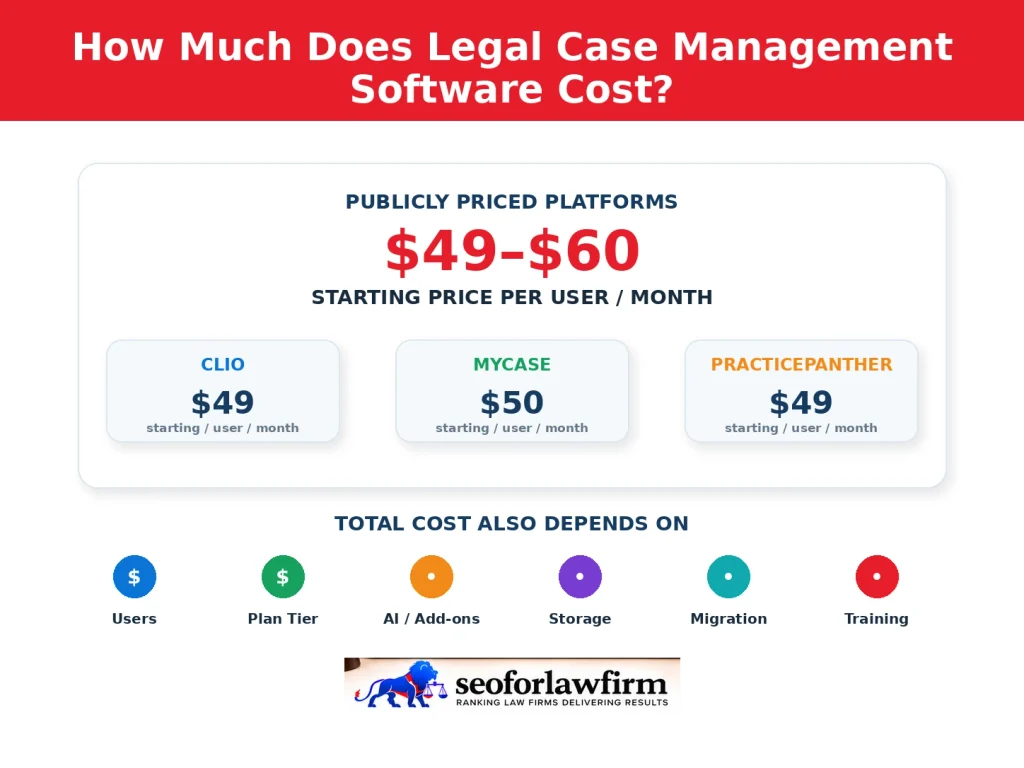
Legal case management software commonly starts at about 49–60 per user per month among publicly priced platforms, while advanced plans, enterprise configurations, and optional services increase the total cost. Clio advertises a starting rate of $49 per user per month, MyCase Basic starts at $50 per user per month when billed annually or $60 when billed monthly, and PracticePanther starts at $49 per user per month. Pricing varies according to the provider, number of users, billing frequency, plan level, workflow features, AI functionality, document storage, intake tools, electronic signatures, and implementation requirements.
Enterprise firms may receive custom quotations based on configuration and migration complexity, while setup, data transfer, employee training, transaction fees, and optional products can add to the subscription price. Annual contracts may reduce the effective monthly rate compared with month-to-month billing. Law firms should therefore compare total annual ownership costs rather than selecting software solely on its advertised entry-level price.
The table below shows starting prices, higher-tier examples, and other cost factors law firms should evaluate.
| Legal Software or Cost Factor | Pricing or Structure | What Law Firms Should Evaluate |
| Clio | $49/user/month starting rate | Higher tiers, optional products, implementation, and integrations |
| MyCase | $50/user/month annually or $60 monthly | Advanced plan: $130/user/month annually |
| PracticePanther | $49/user/month starting rate | Business Pro: $114/user/month |
| Per-user subscriptions | Cost increases with licensed users | Total number of attorneys and staff requiring access |
| Tiered pricing | Higher plans cost more | Workflow automation, reporting, accounting, and document functions |
| Optional add-ons | Separate or additional charges may apply | Intake, AI, e-signatures, storage, and other services |
| Enterprise pricing | Custom quotation | Firm size, configuration, security, and implementation requirements |
| Setup and migration | Additional project costs may apply | Data migration, workflow configuration, and employee training |
| Monthly vs. annual billing | Annual plans may reduce effective monthly cost | Contract flexibility, discounts, and total annual commitment |
These prices exclude potential taxes, transaction fees, migration expenses, implementation charges, and optional services.
How Does Workflow Automation Improve Legal Case Management?
Workflow automation improves legal case management by assigning recurring tasks, generating reminders, routing documents, and moving matters through defined stages with fewer manual administrative steps. Attorney billing and case management tools can connect recurring task assignments with matter deadlines, time records, and billing stages within the same workflow.
A personal injury firm can configure workflows for intake, investigation, medical record requests, demand preparation, negotiation, and settlement processing. When a matter reaches a defined stage, the system can assign appropriate tasks or trigger a scheduled follow-up.
Legal teams should test these processes and retain human oversight for legal deadlines, attorney decisions, and confidential client communications. Firms requiring integrations beyond their main platform should compare legal workflow automation software according to supported applications, reliability, security, and staff responsibilities.
What Are the Biggest Mistakes Law Firms Make When Switching Case Management Software?
The biggest mistakes law firms make when switching case management software include failing to define requirements, skipping testing, and neglecting staff training. These errors can disrupt case workflows, create incomplete records, and increase implementation expenses.
Listed below are 10 common mistakes law firms make when changing legal case management systems.
- Choosing software without defined requirements: Firms purchase platforms before identifying necessary case workflows, reporting functions, and practice-area features.
- Migrating inaccurate records: Duplicate client contacts, outdated matters, and inconsistent file names create problems in the new system.
- Underestimating data migration: Transferring documents, notes, custom fields, billing records, and historical activity requires careful preparation.
- Skipping pilot testing: Firms introduce software across the entire practice without testing representative matters.
- Failing to assign a system administrator: No individual takes responsibility for configuration, user permissions, vendor communication, and maintenance.
- Neglecting staff training: Attorneys and support staff receive insufficient instruction on the new processes.
- Ignoring integrations: Existing calendars, email accounts, accounting services, and document systems are not properly connected.
- Overlooking security configuration: Poorly configured permissions and authentication controls expose confidential information.
- Failing to protect active deadlines: Migration activities interrupt legal calendaring, task monitoring, or client communication.
- Neglecting post-migration evaluation: Firms fail to measure whether the new platform improves timekeeping, document access, and administrative workflows.
A migration plan should also preserve access to historical records, establish backup procedures, and identify responsibility for reviewing transferred information.