You run a technical SEO audit for a law firm by checking whether Google can crawl, render, index, understand, and serve the website correctly. The Technical audit must focus on important practice-area, attorney, location, and legal-resource pages and identify technical barriers that limit search visibility.
A law firm technical SEO audit starts with Google Search Console, Google PageSpeed Insights, and a website crawler such as Screaming Frog or Sitebulb. These tools identify indexing problems, broken internal links, redirect chains, canonical conflicts, duplicate metadata, slow pages, Core Web Vitals problems, and other technical conditions that can interfere with Search visibility.
Crawlability and indexability require separate checks. A page needs to be accessible to Googlebot, return a working HTTP status, and contain indexable content before it is eligible for Google Search. Eligibility does not guarantee indexing or rankings.
The audit also needs to inspect robots.txt, XML sitemaps, noindex directives, canonical tags, internal links, orphan pages, redirects, HTTP status codes, HTTPS configuration, JavaScript rendering, mobile accessibility, structured data, images, and page performance.
Page speed must be assessed with current Core Web Vitals rather than a universal “load in under 3 seconds” rule. Google’s current good-performance thresholds are LCP ≤2.5 seconds, INP <200 milliseconds, and CLS <0.1. Core Web Vitals contribute to Google’s ranking systems, but good scores do not guarantee rankings.
Listed below are the 19 steps to run a technical SEO audit for a law firm website.
- 1. Configure Google Search Console and audit tools: Connect Google Search Console, analytics, crawling software, and performance tools before starting the audit. Confirm that each platform can access the correct domain, property, and website data.
- 2. Crawl the entire law firm website: Run a complete crawl to identify accessible URLs, status codes, metadata, canonicals, internal links, and technical patterns. Use the crawl as the baseline for identifying site-wide problems.
- 3. Check Page Indexing and important URLs: Review Google Search Console’s Page Indexing data to determine which URLs Google has indexed or excluded. Inspect high-value practice-area, attorney, location, and conversion pages individually.
- 4. Audit robots.txt: Check whether robots.txt blocks Googlebot or other search crawlers from important website sections. Remove unintended restrictions that prevent important resources or pages from being crawled.
- 5. Verify XML sitemap quality and submission: Confirm that XML sitemaps contain canonical, indexable, and valuable URLs. Submit current sitemaps through Google Search Console and remove broken, redirected, duplicate, or noindex URLs.
- 6. Audit noindex and other robots directives: Review meta robots tags and HTTP headers for directives that affect indexing or link processing. Confirm that important legal-service pages do not contain unintended noindex instructions.
- 7. Review canonical tags and duplicate URLs: Check canonical tags to determine whether duplicate or similar URLs point to the correct preferred version. Investigate conflicting canonicals, parameter URLs, duplicate pages, and inconsistent protocol or hostname versions.
- 8. Find broken links and HTTP status errors: Identify internal links leading to 404, 410, 5xx, or other problematic responses. Repair links, restore valuable pages, or redirect obsolete URLs to relevant destinations.
- 9. Audit redirects and redirect chains: Review 301 and 302 redirects to confirm that users and crawlers reach the intended destination. Replace unnecessary redirect chains and loops with direct redirects where possible.
- 10. Review site architecture and crawl depth: Measure how many internal clicks separate important pages from the homepage or primary navigation. Keep major practice-area, attorney, location, and conversion pages easy for users and search engines to reach.
- 11. Find orphan pages and audit internal links: Identify valuable pages that receive no crawlable internal links from other website pages. Add relevant contextual, navigational, breadcrumb, or hub-page links where those relationships make sense.
- 12. Verify mobile rendering and content parity: Test important pages on mobile devices to confirm that users and Google can access the same meaningful content and functionality. Check menus, forms, calls, images, text, and interactive elements for rendering problems.
- 13. Measure Core Web Vitals: Review Largest Contentful Paint, Interaction to Next Paint, and Cumulative Layout Shift using field and diagnostic data. Prioritize problems affecting high-value templates and pages with meaningful organic traffic.
- 14. Diagnose page-speed bottlenecks: Identify slow servers, oversized images, render-blocking resources, excessive scripts, unused code, and inefficient third-party tools. Address bottlenecks that delay meaningful content or user interaction.
- 15. Verify HTTPS and security consistency: Confirm that important URLs load securely through HTTPS without mixed-content warnings or certificate problems. Redirect HTTP versions consistently and prevent duplicate secure and non-secure page versions.
- 16. Audit structured data: Validate applicable schema markup for attorneys, organizations, breadcrumbs, articles, and other supported entities. Ensure structured data reflects visible page content and follows search-engine guidelines.
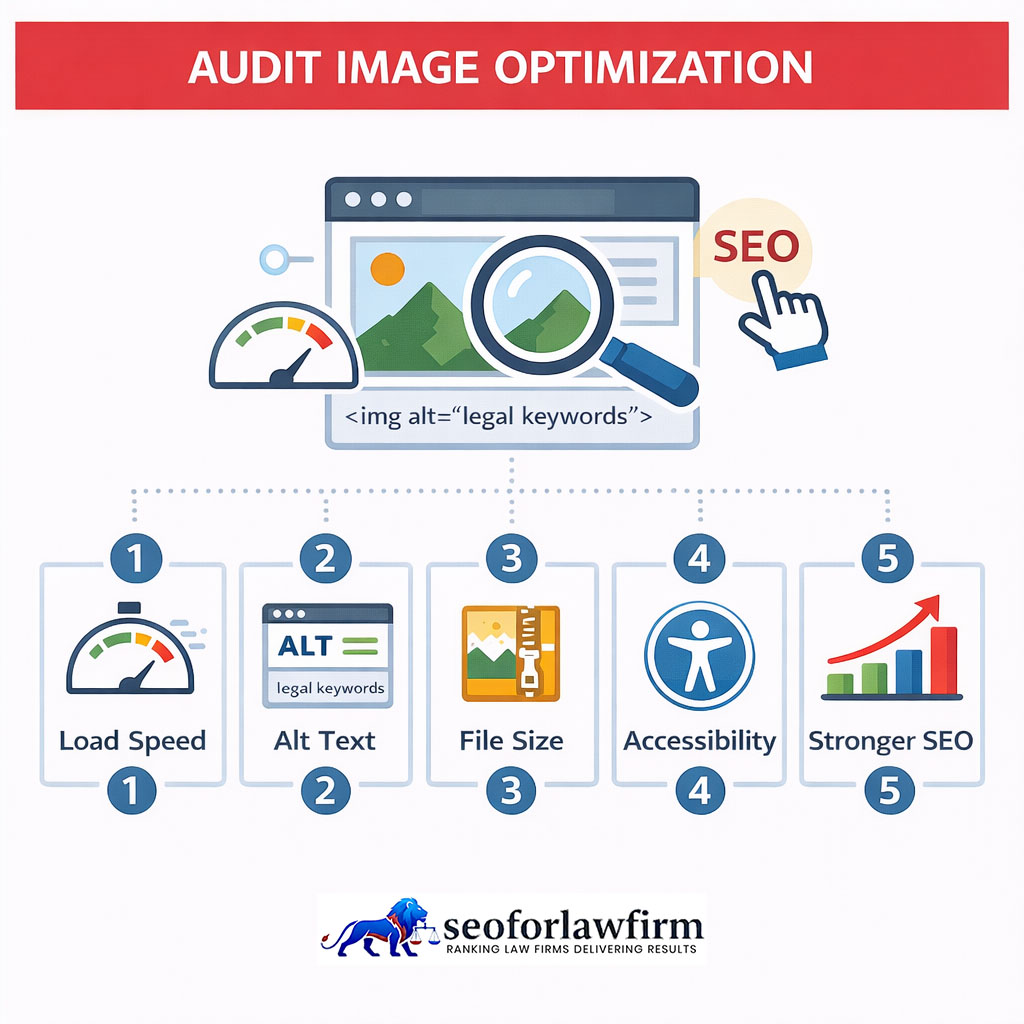
- 17. Review images and media delivery: Check image dimensions, compression, formats, loading behavior, alt text, and broken media resources. Reduce unnecessary file weight without removing information users need.
- 18. Test JavaScript rendering and crawlability: Confirm that JavaScript-dependent content, links, forms, and navigation render correctly for search engines and users. Investigate important content that appears only after failed scripts, delayed interactions, or blocked resources.
- 19. Prioritize, validate, and monitor technical fixes: Rank technical issues by search impact, business value, affected URLs, implementation effort, and confidence. Re-crawl affected pages and monitor Search Console after deployment to confirm that each fix produced the intended result.
Table of Contents
- Article sections will appear here.
1. Configure Google Search Console and Audit Tools
Configure Google Search Console, PageSpeed Insights, a desktop crawler, GA4, and browser-development tools before changing the law firm website. These tools establish the baseline used to compare technical conditions before and after implementation. Search Console provides Google-specific crawling and indexing data.
A crawler maps URLs, links, canonicals, redirects, and status codes across the site. PageSpeed Insights measures performance and Core Web Vitals, while GA4 connects organic traffic with calls, forms, and other lead actions. Record the audit date and major site conditions so later measurements can be compared against the same starting point.
Listed below are the 11 main baseline measurements to record.
- Indexed Pages: Record how many important website pages currently appear in Google’s index.
- Non-Indexed Important Pages: Identify practice-area, attorney, location, and conversion pages that Google has not indexed.
- Organic Clicks: Record clicks from organic search before technical changes begin.
- Organic Impressions: Measure how the website appears in organic search results.
- Core Web Vitals: Record current LCP, INP, and CLS performance for important page groups.
- 4XX URLs: Identify URLs returning client-side errors such as 404 responses.
- 5XX URLs: Identify server-side errors that can prevent users and crawlers from accessing pages.
- Redirect Chains: Record URLs that pass through multiple redirects before reaching the final destination.
- Broken Internal Links: Identify internal links pointing to unavailable or incorrect URLs.
- Canonical Conflicts: Find pages where canonical signals point to unexpected or inconsistent URLs.
- Organic Calls and Forms: Record current organic lead actions so later technical changes can be compared with conversion performance.
2. Crawl the Entire Law Firm Website
Crawl the entire law firm website to create a technical inventory of URLs, internal links, response codes, redirects, canonicals, metadata, and crawl paths. A desktop crawler such as Screaming Frog or Sitebulb can reveal site-wide technical problems that are difficult to identify manually.
The crawl must show how search-engine bots can move through the website and which URLs return errors, redirects, conflicting canonical signals, weak metadata, or limited internal-link support. Crawl data must then be compared with Google Search Console because a crawler shows what the website exposes through its architecture, not which URLs Google has actually indexed.
Listed below are the 12 main elements to review in the website crawl.
- 200 URLs: Identify pages that return successful HTTP responses.
- 3XX Redirects: Find URLs that redirect users and crawlers to another destination.
- 4XX Errors: Identify missing or unavailable pages, including 404 URLs.
- 5XX Errors: Find server-side failures that prevent pages from loading correctly.
- Canonical Targets: Review which preferred URLs each page identifies through canonical tags.
- Noindex URLs: Identify pages carrying directives that prevent indexing.
- Missing or Duplicate Titles: Find pages with absent, repeated, or conflicting title tags.
- Missing Headings: Identify important pages without clear primary headings.
- Low Internal-Link Pages: Find pages receiving few crawlable internal links from the rest of the website.
- Redirect Chains: Identify URLs that pass through multiple redirects before reaching their final destination.
- Large Images: Find oversized media files that can affect page-loading performance.
- Broken Internal Resources: Identify broken links, images, scripts, stylesheets, and other internal resources.
3. Check Page Indexing and Important URLs
Check whether Google has indexed the law firm pages that are intended to generate search visibility and client enquiries. Google Search Console’s Page Indexing report shows indexed and non-indexed URLs and provides reasons for many exclusions. Not every excluded URL requires correction because redirects, duplicate URLs, filter pages, obsolete content, and deliberately excluded pages can remain outside the index.
The audit must focus on whether canonical versions of high-value practice-area, attorney, location, service, and conversion pages are indexed. URL Inspection can then provide page-level information for important URLs that are new, missing from search, or experiencing unexpected visibility loss. A broader Google indexing SEO process can also separate discovery, crawling, rendering, indexing, and serving problems.
Listed below are the 5 main URLs to inspect individually.
- Main Practice-Area Pages: Confirm that primary legal-service pages are indexed and recognized as the intended canonical versions.
- Attorney Pages: Check whether attorney biographies and profile pages intended for search visibility are indexed.
- Location Pages: Verify indexing for office, city, county, and other legitimate geographic service pages.
- New Service Pages: Inspect recently published pages to determine whether Google has discovered, crawled, and indexed them.
- Pages With Lost Visibility: Review previously performing pages that have experienced unexpected ranking, impression, or click declines.
4. Audit robots.txt
Audit robots.txt to confirm that important law-firm pages and resources are not unintentionally blocked from Googlebot. The robots.txt file controls crawler access to URLs, so the audit must focus on whether valuable practice-area, location, attorney, and supporting resources remain crawlable.
A robots.txt rule does not reliably remove a URL from Google Search because Google can still discover and display a blocked URL without crawling its content. Pages that must remain outside Search must use suitable indexing controls or authentication. Private client portals, case files, intake records, and other confidential material must rely on access controls rather than robots.txt.
Listed below are the 7 main robots.txt issues to review.
- Site-Wide Disallow Rules: Check for directives that accidentally block the entire production website.
- Blocked Practice-Area Directories: Confirm that important legal-service sections remain accessible to Googlebot.
- Blocked Location Directories: Verify that valid office and geographic service pages are not excluded from crawling.
- Blocked CSS or JavaScript: Check whether blocked resources prevent Google from rendering important page content correctly.
- Staging Rules in Production: Remove restrictions copied from development or staging environments when they block live pages.
- Incorrect Wildcard Rules: Review wildcard and path-matching directives for unintended URL exclusions.
- Private Content Protection: Use authentication or other access controls for confidential client and case information instead of relying on robots.txt.
5. Verify XML Sitemap Quality and Submission
Verify that the XML sitemap contains the canonical, indexable URLs the law firm wants search engines to discover. The sitemap must include important practice-area, attorney, location, service, and legal-resource pages that return successful responses and represent their preferred canonical versions. The sitemap must exclude 404 URLs, redirects, noindex pages, duplicate variants, obsolete pages, and noncanonical URLs.
Law firms must submit and monitor the sitemap through Google Search Console’s Sitemaps report so discovery issues can be identified. A sitemap helps search engines discover URLs, but sitemap submission does not guarantee crawling, indexing, or rankings.
6. Audit noindex and Other Robots Directives
Audit robots meta tags and HTTP headers to identify important law-firm pages that are accidentally excluded from Google Search. A noindex directive tells Google not to index a page, so the audit must review practice-area pages, location pages, attorney profiles, contact pages, ranking resources, and recently migrated URLs.
Google needs to crawl a URL before it can read the noindex instruction, so blocking the same URL with robots.txt can prevent Google from seeing that directive. The audit must also inspect X-Robots-Tag headers when PDFs and other non-HTML resources require indexing controls.
7. Review Canonical Tags and Duplicate URLs
Review canonical tags to confirm that duplicate or substantially similar law-firm URLs point toward the preferred representative URL. Canonicalization helps Google consolidate duplicate signals, but canonical tags act as hints rather than absolute directives. Google can select a different canonical when redirects, internal links, sitemaps, or other signals conflict with the declared URL.
The audit must therefore compare rel=”canonical” annotations with internal linking, redirects, sitemap entries, and preferred URL structure. Duplicate content does not automatically create a Google penalty, but uncontrolled duplication can divide crawling, indexing, reporting, and link signals across unnecessary URL variants.
Listed below are the 9 common sources of canonical and duplicate-URL problems on law-firm websites.
- HTTP-to-HTTPS Migrations: Check whether old HTTP URLs redirect and canonicalize consistently to HTTPS versions.
- WWW-to-Non-WWW Changes: Confirm that hostname variants point to one preferred version.
- Website Redesigns: Review canonical tags after URL changes, template changes, and migrations.
- URL Parameters: Identify parameter-based URLs that create duplicate or near-duplicate versions of the same page.
- Tracking Parameters: Confirm that campaign-tracking URLs consolidate toward the clean canonical URL where appropriate.
- Duplicate Location Templates: Review city and location pages for unnecessary duplication and conflicting canonical signals.
- CMS-Generated Category URLs: Check whether category, tag, archive, or taxonomy pages duplicate primary content.
- Printer-Friendly URLs: Confirm that printable page versions do not compete with primary pages for indexing.
- Conflicting Canonical Signals: Align internal links, redirects, XML sitemaps, and canonical tags with the intended preferred URL.
8. Find Broken Links and HTTP Status Errors
Find broken internal links and incorrect HTTP responses that interrupt navigation or prevent crawlers from reaching important law-firm content. The audit must separate valid 404 responses from broken links that still send users and crawlers to missing resources. A 404 response can be appropriate when content no longer exists and has no suitable replacement, but internal links pointing to that URL must still be corrected.
Important 5XX errors require faster attention because server failures can block access to high-value pages. A broken-link SEO audit must determine whether each affected URL needs repair, redirection, removal, or restoration.
Listed below are the 7 main broken-link and HTTP status issues to review.
- Internal Links Returning 404: Find links that send users and crawlers to pages that no longer exist.
- Important URLs Returning 5XX: Identify server errors affecting practice-area, attorney, location, contact, or conversion pages.
- Soft 404s: Find pages that return a successful status code but contain little or no useful content and function like missing pages.
- Broken Navigation Links: Check menus, breadcrumbs, footer links, and other navigation elements for unavailable destinations.
- Broken CTA Links: Verify that consultation, contact, call, scheduling, and form links reach the intended destination.
- Broken Attorney-Profile Links: Confirm that attorney names and profile references lead to active biography pages.
- Broken Images or Script Resources: Identify unavailable media, JavaScript, stylesheets, and other resources that affect rendering or page functionality.
9. Audit Redirects and Redirect Chains
Audit redirects to confirm that retired or moved law-firm URLs send users and search engines directly to the most relevant replacement page. Permanent URL changes must use an appropriate permanent server-side redirect, and redirects must point straight to the final destination instead of passing through multiple intermediate URLs.
Redirect chains add unnecessary requests and make crawling, maintenance, and website migrations harder to manage. Law firms must also avoid redirecting every deleted legal page to the homepage because the destination must match the original page’s purpose whenever a suitable replacement exists. A retired motorcycle-accident page with a direct successor must redirect to that successor, while a page with no comparable replacement can return an appropriate 404 or 410 response.
10. Review Site Architecture and Crawl Depth
Review site architecture to ensure important practice-area, attorney, location, and client-resource pages sit within a logical and crawlable hierarchy. A law-firm website can connect the homepage to practice-area hubs and then to specific legal services, while location hubs can connect to office pages and local practice-area pages. Important pages must remain discoverable through crawlable internal links rather than depend on internal search forms or obscure navigation states.
Site architecture influences crawl discovery, internal-link relationships, user navigation, topical relationships, and page prominence. Law firms do not need to force every page within a fixed three-click limit. The audit must instead confirm that commercially valuable pages are easy to reach, logically connected, and supported by sufficient internal links.
11. Find Orphan Pages and Audit Internal Links
Find orphan pages and audit whether internal links connect related legal content with relevant practice-area, attorney, and location pages. An orphan page has no crawlable internal links pointing to it through the website’s normal architecture, which can limit discovery and weaken its relationship with other content.
Law firms must compare crawler data with XML sitemaps, analytics, and Google Search Console URL sets to identify pages that exist but do not appear in the internal crawl. Internal links must use descriptive anchor text that accurately represents the destination rather than repeated generic phrases such as “click here.” A dedicated law firm internal-linking strategy can connect informational resources with commercial service pages while maintaining natural anchor variation.
Listed below are the 8 common causes of orphan pages and internal-link problems.
- Website Migrations: Pages can lose internal links when URLs, templates, or navigation structures change.
- Deleted Navigation: Removing menu, breadcrumb, or hub links can leave valuable pages disconnected from the site architecture.
- Old Campaign Pages: PPC or campaign landing pages can remain live after campaigns end without receiving internal links.
- Poor CMS Workflows: Publishing systems can create URLs without automatically integrating them into relevant categories, hubs, or navigation.
- Unintegrated Content: Articles and legal resources can remain isolated when editors publish them without linking them to related service or topic pages.
- Generic Anchor Text: Repeated phrases such as “click here” provide less context than descriptive anchors tied to the destination.
- Weak Service-Content Connections: Informational articles must link naturally to relevant practice-area pages when the relationship supports user intent.
- Weak Attorney and Location Connections: Attorney profiles and location pages must connect with the services and offices they genuinely represent.
12. Verify Mobile Rendering and Content Parity
Verify that the mobile version of the law firm website contains the substantive content, metadata, structured data, links, images, and functionality needed by users and Google. Google uses the mobile version of page content for indexing and ranking, so mobile pages must preserve the information and signals available on desktop.
Law firms must not remove meaningful legal information merely to shorten mobile pages. Tabs and accordions can organize long content when that content remains available in the rendered page. Current testing must use responsive browser testing, Chrome DevTools, real devices, Lighthouse, rendering checks, and URL Inspection rather than the retired Mobile-Friendly Test or Mobile Usability report.
Listed below are the 12 main mobile elements to audit.
- Responsive Layouts: Confirm that pages adapt correctly to different screen sizes without horizontal scrolling or overlapping elements.
- Menus: Verify that navigation remains accessible and exposes important practice-area, attorney, and location pages.
- Attorney Information: Ensure biographies, credentials, contact details, and related practice information remain visible on mobile.
- Practice-Area Content: Confirm that substantive legal-service content appears on mobile and is not removed from the rendered page.
- Internal Links: Verify that mobile pages preserve crawlable links to related services, attorneys, locations, and resources.
- Forms: Test intake and contact forms for usability, field visibility, validation, and successful submission.
- Telephone Links: Confirm that click-to-call links work correctly on mobile devices.
- Images: Check image loading, dimensions, responsiveness, alt text, and visual clarity.
- Headings: Verify that heading structure remains logical and consistent with the desktop version.
- Titles and Descriptions: Confirm that mobile URLs use the intended title tags and meta descriptions.
- Robots Directives: Check that mobile-rendered pages do not introduce unintended noindex or other robots directives.
- Structured Data: Verify that structured data remains present, accurate, and consistent with visible mobile content.
13. Measure Core Web Vitals
Measure Largest Contentful Paint (LCP), Interaction to Next Paint (INP), and Cumulative Layout Shift (CLS) to evaluate real-world loading performance, responsiveness, and visual stability on the law firm website. Good performance thresholds are LCP at 2.5 seconds or less, INP below 200 milliseconds, and CLS below 0.1.
Law firms must use field data where available because real-user measurements show how actual visitors experience important practice-area, attorney, location, and conversion pages. Core Web Vitals contribute to Google’s page-experience signals, but strong scores alone do not guarantee higher rankings.
Listed below are the 9 common Core Web Vitals problems on law firm websites.
- Large Hero Images: Oversized images can delay the largest visible content and increase LCP.
- Heavy Video Embeds: Video players and external media resources can slow initial page rendering.
- Live-Chat Widgets: Chat software can add JavaScript processing and reduce interaction responsiveness.
- Call-Tracking Scripts: Multiple tracking scripts can increase browser workload and affect INP.
- Review Widgets: Third-party review tools can add external requests, scripts, and layout movement.
- Cookie-Management Scripts: Consent platforms can delay rendering or introduce additional processing.
- Advertising Scripts: Advertising and remarketing scripts can increase network requests and JavaScript execution.
- Font Loading: Slow or improperly configured fonts can delay visible content or cause layout changes.
- Forms and Banners: Late-loading forms, notices, or banners can shift visible content and increase CLS.
14. Diagnose Page-Speed Bottlenecks
Diagnose the resources and processing delays that make important law-firm pages load or respond slowly. Page-speed auditing must focus on the technical causes of poor performance rather than a universal “under 3 seconds” target.
The audit must instead examine image weight, JavaScript execution, server response time, caching, fonts, redirects, third-party scripts, and page structure. A law firm site-speed optimization process can improve performance without removing features that support lead generation or client communication.
Listed below are the 10 common page-speed bottlenecks on law-firm websites.
- Oversized Images: Large image files can delay visible content and increase loading time.
- Unused JavaScript: Unnecessary scripts can increase processing time without supporting the page experience.
- Render-Blocking Resources: CSS and JavaScript can delay the browser from displaying meaningful content.
- Slow Server Responses: Weak hosting or backend processing can delay the initial page response.
- Excessive Plugins: Too many plugins can add scripts, database requests, and processing overhead.
- Third-Party Scripts: Chat, analytics, reviews, advertising, and tracking tools can increase network and browser workload.
- Excessive Font Files: Multiple font families, weights, and styles can slow text rendering.
- Large DOM Structures: Excessive page elements can increase rendering and interaction costs.
- Poor Caching: Weak browser or server caching can force repeated downloads of unchanged resources.
- Long Redirect Chains: Multiple redirects add extra requests before users and crawlers reach the final page.
15. Verify HTTPS and Security Consistency
Verify that the entire public law-firm website uses valid HTTPS and that HTTP versions consistently resolve to the intended HTTPS URLs. HTTPS protects data transmitted between users and the website and supports client trust, especially on contact forms and intake pages.
The audit must confirm that redirects, canonical tags, XML sitemaps, internal links, and page resources consistently use the secure URL version. Mixed-content errors, expired certificates, or redirects back to HTTP can create security and crawling problems. HTTPS supports a secure website experience, but law firms must not treat HTTPS alone as a mechanism that automatically produces higher rankings.
Listed below are the 8 main HTTPS and security consistency checks.
- Certificate Validity: Confirm that the SSL/TLS certificate is active, valid, and correctly configured for the domain.
- HTTP-to-HTTPS Redirects: Verify that HTTP URLs redirect directly to their intended HTTPS versions.
- HTTPS Canonicals: Confirm that canonical tags reference secure HTTPS URLs.
- HTTPS Sitemap URLs: Ensure XML sitemaps contain the preferred HTTPS versions of indexable pages.
- Mixed-Content Resources: Find images, scripts, fonts, or other resources loaded through insecure HTTP connections.
- Internal HTTP Links: Update internal links that still point to HTTP versions of website pages.
- Expired Certificates: Identify certificate expiration or configuration problems that can trigger browser security warnings.
- HTTPS-to-HTTP Redirects: Remove redirect rules that send secure URLs back to insecure HTTP destinations.
16. Audit Structured Data
Audit structured data to confirm that markup accurately represents visible law-firm entities and follows Google’s requirements for supported Search features. Law firms can use schema.org vocabulary such as Organization, LocalBusiness, breadcrumb markup, profile-page markup, and other entity types that accurately describe visible page content. LegalService exists in schema.org, but Google does not provide a dedicated LegalService rich result, so firms must not expect special legal-service search features from that markup alone.
LocalBusiness markup can describe information such as addresses, telephone numbers, and opening hours when the implementation fits the page. Self-serving review markup on business-controlled LocalBusiness or Organization pages must not be expected to generate review stars. Law firms must validate supported markup with Google’s Rich Results Test and use a structured data guide for law firms to align schema with page entities rather than treat structured data as a generic ranking factor.
17. Review Images and Media Delivery
Review images and media to improve page performance, accessibility, rendering, and search interpretation across the law firm website. The audit must examine image dimensions, file sizes, delivery formats, responsive behavior, lazy loading, broken media URLs, width and height attributes, and alternative text.
Alt text must describe the image’s relevant content or function rather than repeat legal keywords for SEO. An attorney photograph can use descriptive text such as alt=” Attorney Jane Smith”, while decorative images can use an empty alt attribute when appropriate for accessibility.
Listed below are the 10 main image and media checks.
- Image Dimensions: Confirm that uploaded images use dimensions appropriate for their rendered size.
- File Sizes: Compress unnecessarily large files that slow page loading.
- Modern Formats: Use suitable modern image formats when they reduce file weight without harming quality.
- Responsive Delivery: Serve image sizes that adapt to different devices and screen widths.
- Lazy Loading: Delay off-screen images where appropriate without delaying important above-the-fold content.
- Broken Image URLs: Find and repair missing or unavailable image resources.
- Width and Height Attributes: Define image dimensions where appropriate to reduce unexpected layout movement.
- Descriptive Alt Text: Describe meaningful images accurately and concisely.
- Keyword-Stuffed Alt Text: Remove unnatural phrases such as alt=”best personal injury lawyer attorney law firm near me”.
- Decorative Images: Use empty alt attributes for decorative images when accessibility conventions support that treatment.
18. Test JavaScript Rendering and Crawlability
Test JavaScript rendering and crawlability to confirm that important legal content, navigation, links, metadata, and conversion elements remain accessible to Google when pages depend on JavaScript. Google can render JavaScript, but implementation problems can prevent search engines from seeing content or links as intended.
The audit must compare rendered pages with what users see and verify that important internal links use crawlable anchors. Content that appears only after unsupported user interactions can create discovery or rendering problems. URL Inspection can help confirm whether Google can access and render the important elements on each page.
Listed below are the 10 main JavaScript elements to test.
- Client-Rendered Content: Confirm that important page content appears in the rendered output.
- Menu Links: Verify that navigation links remain crawlable and lead to valid URLs.
- Pagination: Check whether paginated content exposes accessible links to additional pages.
- Practice-Area Text: Confirm that substantive legal-service content renders correctly.
- Location Information: Verify that office and geographic details remain visible to users and search engines.
- Attorney Data: Confirm that attorney names, credentials, biographies, and related information render correctly.
- Forms: Test whether contact and intake forms load and function without JavaScript errors.
- Canonical Tags: Verify that rendered pages expose the intended canonical URL.
- Robots Directives: Confirm that JavaScript does not introduce unintended indexing directives.
- Structured Data: Check whether structured data remains present and valid after rendering.
19. Prioritize, Validate, and Monitor Technical Fixes
Prioritize technical SEO fixes according to search impact, URL importance, affected-page count, business value, and implementation risk, then validate each change after deployment. Not every crawler warning deserves the same level of attention. A revenue-generating page accidentally marked noindex requires faster action than a minor metadata issue on a low-value archive page.
Law firms must address problems that block crawling, rendering, indexing, or access to important service pages before lower-impact cleanup work. Technical SEO auditing must continue after implementation because fixes need validation and ongoing monitoring.
Listed below are the 14 main priority levels and validation steps.
- Immediate Priority: Fix severe problems such as a revenue-generating page accidentally carrying a noindex directive.
- High Priority: Repair important practice-area pages returning 5XX errors.
- High Priority: Resolve mobile rendering problems that prevent Google from accessing substantive content.
- High Priority: Correct canonical tags that point important service pages toward the wrong URLs.
- Medium Priority: Repair broken internal links affecting several important pages.
- Medium Priority: Improve poor Core Web Vitals across high-traffic or high-value templates.
- Lower Priority: Address minor metadata warnings on low-value archive or utility pages after higher-impact issues are resolved.
- Recrawl Affected URLs: Run another crawl to confirm that the technical change appears across the intended pages.
- Test Live Pages: Verify that users and search engines can access the corrected pages.
- Check Status Codes: Confirm that repaired URLs return the intended HTTP responses.
- Reinspect Important URLs: Use Google Search Console to review important pages after deployment.
- Validate Structured Data: Retest affected markup when technical changes modify structured data.
- Review Performance Measurements: Compare page-speed and Core Web Vitals data after implementation.
- Monitor Indexing and Search Visibility: Track whether corrected pages regain or maintain indexing, impressions, clicks, and search visibility.
What Is a Law Firm Technical SEO Audit?
A law firm technical SEO audit is a diagnostic review of the website systems that affect crawling, rendering, indexing, canonicalization, page experience, site architecture, and search eligibility. Technical SEO auditing determines whether search engines can reliably access and process legal content before content quality or persuasive value is evaluated. Google Search eligibility requires Googlebot access, a successful URL response, and indexable page content, but meeting those conditions does not guarantee indexing.
Law firms must prioritize practice-area pages, attorney biographies, office and location pages, contact pages, major legal guides, high-performing informational pages, and conversion landing pages. Technical issues must also be ranked by business impact because a noindex directive on a high-value personal injury, divorce, criminal defense, or estate-planning page creates a greater search and client-acquisition problem than the same error on a low-value archive page.
What Tools Are Used for a Technical SEO Audit for Law Firms?
The main tools used for a law firm technical SEO audit are Google Search Console, PageSpeed Insights, Screaming Frog or Sitebulb, Chrome DevTools, Lighthouse, GA4, and server logs. Google Search Console shows how Google crawls, indexes, and evaluates important law-firm URLs, while desktop crawlers analyze the website through its internal link structure.
PageSpeed Insights and Lighthouse diagnose page performance and Core Web Vitals. Chrome DevTools examines JavaScript, network activity, rendering, and layout behavior. GA4 connects organic landing pages with calls, forms, and other conversion events. Server logs show how search-engine crawlers actually request website resources. Law firms must combine these tools because each platform measures a different part of technical search performance.
The table below shows the primary role of each technical SEO audit tool.
| Tool | Primary Audit Role | Examples of Issues Found |
| Google Search Console | Google crawling, indexing, search performance, and Core Web Vitals | Unindexed URLs, canonical differences, server errors, indexing problems, Core Web Vitals |
| PageSpeed Insights | Performance and Core Web Vitals | LCP, INP, CLS, rendering delays, and resource problems |
| Screaming Frog or Sitebulb | Site-wide technical crawling | 404s, redirects, canonicals, internal-link problems, orphan signals, and duplicate metadata |
| Chrome DevTools | Browser, rendering, and network diagnostics | JavaScript errors, failed requests, layout shifts, rendering problems, and mobile issues |
| Lighthouse | Controlled page diagnostics | Performance, accessibility, rendering, and technical page issues |
| GA4 | Post-click and conversion measurement | Organic landing-page performance, calls, forms, and conversion events |
| Server Logs | Search-engine crawler activity | Googlebot requests, response codes, crawl frequency, and crawl patterns |
How Is Technical SEO Different From General SEO for Law Firms?
Technical SEO focuses on search access, crawling, rendering, indexing, and website infrastructure. General law firm SEO also covers content, topical relevance, local visibility, backlinks, attorney expertise, and client search intent. Technical SEO determines whether search engines can reliably access and process a page.
Broader SEO determines whether that page satisfies the searcher’s legal need and earns enough relevance and authority to compete. A technically sound page can still perform poorly when the content is weak or misaligned with intent, while a strong legal resource cannot rank when an accidental noindex directive excludes it from the index. Technical and content work must therefore operate together. A law firm content SEO audit can evaluate the content layer after technical access and indexability have been confirmed.
The table below shows the difference between technical SEO and broader law firm SEO.
| Technical SEO | Broader Law Firm SEO |
| Crawling | Keyword and search-intent research |
| Indexing | Practice-area content |
| Canonicalization | Informational content |
| Status Codes | Local SEO |
| Internal Architecture | Google Business Profile optimization |
| Mobile Rendering | Attorney expertise and entity signals |
| Core Web Vitals | Backlink acquisition |
| HTTPS | Reviews and local prominence |
| Structured Data | Conversion strategy |

Is Technical SEO More Important for Law Firms Than Content Optimization?
No, technical SEO is not more important than content refinement for law firms, but it takes priority when foundational issues prevent visibility and indexation. In highly competitive legal niches, even the most valuable legal content remains unseen if technical issues like crawl errors, poor mobile performance, or a misconfigured schema block prevent search engine access.
That’s why strengthening both site infrastructure and content refinement is essential. See how a robust strategy for improving page copy, metadata, and topical depth complements technical fixes to maximize visibility. A 2024 BrightEdge study found that 51% of performance gains in legal websites came from resolving technical and content gaps together, not in isolation. For long-term success, both elements must work together to help a law firm’s website rank, convert, and scale effectively.
Where Can Law Firms Get Professional Technical SEO Services?
SEOForLawFirm.com is a specialized, law-firm-focused SEO provider that connects technical diagnostics with crawling, indexing, site architecture, mobile performance, internal linking, legal content, and organic client acquisition. Law firms can also obtain professional technical SEO services from legal SEO agencies, independent technical SEO consultants, enterprise SEO firms, website-development agencies, and digital marketing companies with technical search expertise.
A qualified provider must identify the technical problem, affected URLs, Google impact, business importance, required fix, implementation owner, validation method, and monitoring metrics. Technical SEO audits must examine crawling, rendering, indexing, canonicals, redirects, Core Web Vitals, structured data, mobile performance, and Search Console data. Providers must prioritize real search barriers and commercially valuable pages rather than rely on arbitrary health scores or guaranteed ranking claims. SEOforLawFirm.com provides law firm SEO services that connect technical diagnostics with indexing, site architecture, mobile performance, legal content, internal linking, and organic client-acquisition measurement.
What Technical SEO Mistakes Do Law Firms Make?
The main technical SEO mistakes law firms make involve crawl controls, indexing directives, internal links, structured data, and failure to validate changes after deployment.
Listed below are 10 common technical SEO mistakes.
- Blocking Important Pages in robots.txt: Practice areas or site resources become inaccessible to crawlers.
- Using robots.txt for Privacy: Confidential material remains publicly reachable because crawler exclusion is not access control.
- Leaving Important Pages noindex: Migration or staging directives accidentally remain on production URLs.
- Submitting Poor Sitemap URLs: Redirects, errors, duplicates, and noncanonical URLs pollute the sitemap.
- Creating Conflicting Canonical Signals: Internal links, sitemaps, redirects, and canonical tags point toward different versions.
- Ignoring Mobile Rendering: Desktop pages contain information or navigation missing from mobile rendering.
- Using Outdated Core Web Vitals Metrics: Reports still track FID instead of INP.
- Treating Every Crawler Warning as Equal: Teams spend resources fixing low-impact warnings before indexing failures on revenue pages.
- Treating Structured Data as a Ranking Hack: Markup is added solely to manipulate Search presentation rather than accurately describe content.
- Failing to Validate Fixes: Development teams deploy a change without recrawling, inspecting URLs, or checking Search Console afterward.
How Can Law Firms Track Results After a Technical SEO Audit?
Law firms can track technical SEO audit results by measuring changes in crawling, indexing, and search visibility. Firms must also monitor leads and client acquisition without assuming every business change came solely from the technical fixes.
Listed below are the 8 main measurements to track after implementation.
- Important URL Indexing: Confirm that intended canonical pages, attorney pages, and location pages are indexed.
- Indexing Errors: Monitor reductions in unintended server errors, blocked URLs, canonical conflicts, and other indexing problems.
- Core Web Vitals: Compare LCP, INP, and CLS before and after performance changes.
- Organic Impressions and Clicks: Use Search Console to identify whether affected pages gain Search exposure.
- Organic Landing-Page Sessions: Use GA4 to measure visits to repaired or improved pages.
- Calls and Forms: Track qualified lead actions originating from organic landing pages.
- Consultations and Signed Matters: Connect organic enquiries with downstream intake outcomes when CRM and attribution systems permit.
- Technical Regression Rates: Monitor whether broken links, redirects, indexing directives, and performance issues return after website updates.