
The best CMS platforms for law firms are WordPress, Webflow, LawLytics, Drupal, Squarespace, Wix, and Xperience by Kentico. WordPress is the best overall CMS for most law firm websites because WordPress provides extensive SEO control, publishing flexibility, content ownership, integrations, custom development options, and enough scalability for practice-area pages, attorney profiles, locations, legal resources, and long-term content growth.
Webflow is a strong choice for design-focused firms that prefer managed hosting and visual website development without maintaining a large plugin stack. LawLytics provides a law-specific managed website platform for attorneys who prefer to combine hosting, website maintenance, publishing, and legal-focused support within one system.
Squarespace and Wix work well for solo practitioners and smaller firms that need straightforward website management with fewer technical responsibilities. Drupal and Xperience by Kentico fit larger firms that require more detailed permissions, content governance, multiple publishing teams, localization, or enterprise-level content operations.
WordPress remains the dominant CMS across the broader web. W3Techs reported on September 29, 2026, that WordPress powered approximately 40.2% of all websites and represented about 58.7% of websites whose CMS could be identified. Its market share does not give WordPress a Google ranking advantage, but the scale of its ecosystem gives law firms extensive access to developers, themes, plugins, integrations, hosting providers, and publishing tools.
A website CMS also needs to be separated from legal case and practice management software. WordPress, Webflow, LawLytics, Drupal, Squarespace, Wix, and Xperience manage public website content, whereas platforms such as Clio manage clients, matters, documents, billing, calendars, tasks, intake, and other internal law firm operations. Clio therefore belongs in a different software category from WordPress or Webflow.
Listed below are the 7 best CMS platforms for law firms.
- 1. WordPress: WordPress is the best overall CMS for law firms that prioritize SEO, content publishing, website ownership, integrations, and custom development. WordPress supports everything from a small attorney website to large multi-office legal sites with thousands of practice-area, attorney, location, and resource pages.
- 2. Webflow: Webflow is best for design-focused law firms that want a visual CMS, managed hosting, responsive layouts, and built-in SEO controls. Webflow reduces several hosting and plugin-management responsibilities associated with a self-managed WordPress installation.
- 3. LawLytics: LawLytics is best for solo lawyers and small-to-midsize law firms that want a legal-specific managed website platform. LawLytics combines website creation, hosting, maintenance, security, forms, publishing tools, reporting, and legal-marketing support within one system.
- 4. Drupal: Drupal is best for larger law firms that need structured content, custom content types, granular user roles, and controlled publishing permissions. Drupal gives development teams extensive control over which users create, edit, approve, and manage different areas of a large legal website.
- 5. Squarespace: Squarespace is best for solo lawyers and smaller firms that want a clean website, managed infrastructure, built-in SEO functionality, and low technical administration. Squarespace automatically manages sitemaps and provides editable SEO descriptions, SSL, structured markup, and other standard search controls.
- 6. Wix: Wix is best for small law firms that prioritize visual editing, managed hosting, simple administration, and extensive built-in SEO controls. Wix currently supports editable URLs, canonicals, robots directives, structured data, XML sitemaps, redirects, metadata, and server-side rendering.
- 7. Xperience by Kentico: Xperience by Kentico is best for large, multi-office, or enterprise law firms that need formal publishing workflows, content governance, localization, user roles, and multiple delivery channels. Xperience supports workflows, taxonomies, website channels, headless channels, multilingual content, role-based administration, and centralized content operations.
Table of Contents
- Article sections will appear here.
1. WordPress
WordPress is the best overall CMS for most law firms because it combines content control, SEO flexibility, website ownership, integrations, custom development, and long-term scalability. Law firms building search-driven websites connect WordPress publishing with a law firm content strategy built around practice areas, locations, attorneys, and supporting legal content. WordPress represents approximately 58.7% of websites using a known CMS according to W3Techs, giving the platform a large development and plugin ecosystem.
WordPress supports themes, plugins, user management, custom content types, publishing tools, and developer APIs, which lets law firms create structured website entities for attorneys, offices, practice areas, industries, verdicts, testimonials, publications, and other recurring content. The platform does not receive higher Google rankings because of the WordPress brand itself. Its SEO advantage comes from the level of control developers and legal marketing teams receive over website architecture, content, technical settings, integrations, and search visibility.
Listed below are the 13 law firm website functions WordPress supports.
- Practice-area pages.
- Attorney biographies.
- Location pages.
- Legal blogs.
- Case-result pages.
- FAQs.
- Resource libraries.
- Landing pages.
- Custom forms.
- Call tracking.
- CRM connections.
- Analytics.
- Structured content.
WordPress also gives law firms control over.
- URL architecture.
- Page templates.
- Metadata.
- Canonical tags.
- Redirects.
- Robots directives.
- XML sitemaps.
- Internal linking.
- Structured data.
- Media.
- Indexability.
2. Webflow
Webflow is one of the best CMS platforms for design-focused law firms because it combines visual development, structured content, managed hosting, responsive design, and SEO controls. Law firms review Webflow CMS Collections when evaluating structured publishing for attorneys, practice areas, locations, testimonials, articles, and other repeatable content.
Webflow Collections store recurring content in structured databases and generate pages from reusable templates, reducing the need to design every legal page independently. The platform also reduces infrastructure maintenance because firms do not need to manage a traditional WordPress server and plugin stack. The trade-off is platform dependence, so complex applications, integrations, or unusual publishing requirements need review before implementation.
Listed below are the 10 SEO controls Webflow provides.
- Meta titles.
- Meta descriptions.
- Indexing rules.
- Redirects.
- Custom URLs.
- XML sitemaps.
- Robots.txt controls.
- Schema markup.
- CMS-generated metadata.
- Image alt text.
Webflow fits law firms that want.
- Modern custom design.
- Managed hosting.
- Responsive layouts.
- Structured CMS Collections.
- Visual page building.
- Fewer website maintenance components.
3. LawLytics
LawLytics is one of the best CMS options for law firms that want a legal-specific managed website instead of maintaining a general-purpose CMS stack. The LawLytics law firm website platform combines website creation, hosting, maintenance, security, publishing, forms, reporting, and legal-marketing support under one provider.
LawLytics is built specifically for lawyers and positions its platform as client-owned and controlled, which distinguishes it from managed providers that retain ownership of core website assets. The model reduces technical administration for attorneys who want to publish content without managing hosting, software updates, backups, or plugins. Portability still needs contract review because a managed CMS creates greater dependence on the provider than an open platform.
Listed below are the 10 functions LawLytics combines.
- Website creation.
- Hosting.
- Maintenance.
- Security.
- Backups.
- Content publishing.
- Forms.
- Reporting.
- Website support.
- Legal marketing guidance.
Law firms also need to review.
- Content export.
- URL control.
- Redirect access.
- Analytics ownership.
- Design portability.
- Integration support.
- Contract terms.
- Migration procedure.
4. Drupal
Drupal is one of the best CMS platforms for large law firms that need structured content, detailed permissions, custom development, and controlled publishing workflows. Law firms review Drupal roles and permissions when planning separate access levels for attorneys, practice-group editors, office editors, marketers, and administrators.
Drupal lets developers define distinct content types and fields, allowing an attorney biography, office, practice area, publication, article, event, and case study to use different data structures. Its role-based permission model also supports organizations where many users participate in publishing but require different editing and administrative rights. Drupal demands greater technical expertise than simpler hosted platforms, so implementation and maintenance need developer support.
Listed below are the 6 editorial roles a large law firm establishes.
- Attorney contributor.
- Practice-group editor.
- Office editor.
- Marketing editor.
- Managing editor.
- Website administrator.
Drupal fits law firms requiring.
- Complex structured content.
- Multiple editorial roles.
- Detailed permissions.
- Custom development.
- Large content inventories.
- Multilingual publishing.
- Developer-managed governance.
5. Squarespace
Squarespace is one of the best CMS platforms for solo lawyers and small firms that want managed hosting, integrated design tools, and limited technical maintenance. The Squarespace SEO feature documentation explains built-in capabilities such as automatically generated sitemaps, clean URLs, SEO descriptions, SSL support, and search-friendly markup.
Squarespace works well for smaller legal websites that need standard firm information, attorney biographies, several practice-area pages, articles, contact information, and forms without a developer-managed server stack. The main constraint is customization depth. Firms expecting hundreds of interconnected attorney, location, industry, service, and resource pages need to assess whether the platform’s content architecture supports their long-term publishing model.
Listed below are the 7 website elements Squarespace suits well.
- Homepage.
- Attorney biographies.
- Practice-area pages.
- Contact page.
- Office information.
- Legal articles.
- Basic forms.
Squarespace also provides.
- Automatic XML sitemaps.
- Clean URLs.
- SSL certificates.
- SEO descriptions.
- Structured markup.
- Mobile optimization.
- Built-in design tools.
6. Wix
Wix is one of the best CMS platforms for small law firms that want visual editing, managed hosting, built-in SEO controls, and straightforward website administration. The Wix SEO features include customizable URLs, metadata, canonical tags, robots directives, structured data, redirects, server-side rendering, and other search controls. Wix works well for solo attorneys, smaller local practices, and firms that do not maintain dedicated development teams.
The platform now provides considerably more technical SEO control than older descriptions of Wix suggest. Firms planning highly specialized templates, complex integrations, large-scale publishing, or intricate content relationships still need to compare Wix with more extensible systems before committing to the platform.
Listed below are the 10 SEO capabilities Wix provides.
- Custom URLs.
- Canonical tags.
- Custom metadata.
- Robots meta directives.
- Robots.txt editing.
- XML sitemaps.
- Structured data.
- Bulk redirects.
- Server-side rendering.
- SEO settings by page type.
7. Xperience by Kentico
Xperience by Kentico is one of the best CMS platforms for enterprise and multi-office law firms that need structured publishing, governance, localization, workflows, and multichannel content delivery.
These capabilities fit large firms where attorneys create material, marketing teams edit it, reviewers approve it, and administrators control publication across offices, languages, websites, and digital channels. Xperience also supports formal approval workflows and role-based access, making it suited to organizations with substantial governance requirements. Smaller local firms rarely need this level of infrastructure.
Listed below are the 9 law firm requirements Xperience by Kentico supports.
- Multiple offices.
- Several countries.
- Multiple languages.
- Large marketing departments.
- Separate practice groups.
- Formal approval requirements.
- Multiple websites.
- Headless applications.
- Centralized content governance.
How Do the Best CMS Platforms for Law Firms Compare?
The best CMS platforms for law firms differ in SEO control, ease of use, maintenance responsibility, customization, content governance, and scalability. WordPress and Drupal provide extensive development and SEO flexibility; Webflow combines strong design control with managed infrastructure; LawLytics offers a legal-specific managed environment; Squarespace and Wix suit smaller firms that want simpler administration; and Xperience by Kentico fits enterprise firms with complex publishing and governance requirements. The right CMS depends on the law firm’s website size, internal technical resources, publishing volume, integration needs, growth plans, and level of development control required.
The table below compares the main CMS platforms for law firms.
| CMS | Best For | SEO Control | Technical Maintenance | Customization |
| WordPress | SEO-focused and growing law firms | Extensive | Firm or provider manages it | Extensive |
| Webflow | Design-focused firms | Strong | Mostly managed | Strong within platform |
| LawLytics | Solo and small-to-midsize law firms | Legal-focused platform controls | Managed | Moderate |
| Drupal | Large and technically complex law firms | Extensive | Developer-led | Extensive |
| Squarespace | Solo lawyers and small firms | Standard built-in controls | Managed | Moderate |
| Wix | Small firms wanting easy management | Strong built-in controls | Managed | Moderate |
| Xperience by Kentico | Enterprise and multi-office law firms | Extensive | Enterprise implementation | Extensive |
What Is the Difference Between a CMS and Legal Practice Management Software?
A CMS manages a law firm’s public website, whereas legal practice management software manages clients, tasks, and internal firm operations. The systems work together rather than replace one another because the CMS handles public-facing content and search visibility, while practice management software supports internal legal workflows after a prospect becomes a client. A law firm uses WordPress for website content and SEO, a CRM or intake platform for prospective clients, and Clio Manage for active matters and practice operations.
The table below shows the difference between a website CMS and legal practice management software:
| Function | Website CMS | Practice Management Software |
| Practice-area pages | Yes | No |
| Attorney biographies | Yes | No |
| Legal blogs | Yes | No |
| SEO metadata | Yes | No |
| Website menus | Yes | No |
| Matter management | No | Yes |
| Client records | Limited | Yes |
| Legal calendaring | No | Yes |
| Document management | No | Yes |
| Time tracking | No | Yes |
| Billing | No | Yes |
| Examples | WordPress, Webflow, LawLytics | Clio, MyCase, PracticePanther |
Which CMS Platforms Are Best for Law Firm Websites?
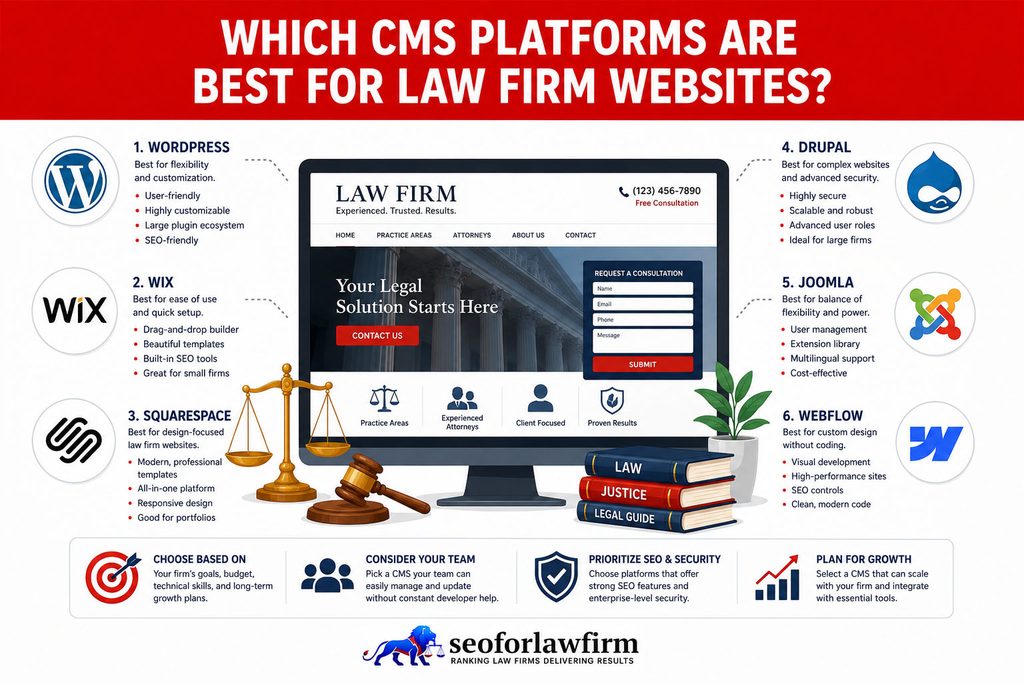
The best CMS platforms for law firm websites are WordPress, Webflow, Drupal, Squarespace, and Wix because each supports legal content publishing, SEO control, and site growth in different ways. WordPress leads for firms that want maximum flexibility and plugin-based SEO tooling, Webflow suits design-first teams that prefer an all-in-one hosted system, and Drupal fits complex or enterprise legal sites needing advanced structure and governance. Squarespace and Wix work well for smaller firms that value simplicity, speed of setup, and low maintenance.
Listed below are the 5 top CMS Options for Law Firms.
- WordPress: The most widely used CMS, offering deep flexibility, a huge plugin ecosystem, and strong SEO customization.
- Webflow: A modern, design-driven platform with built-in hosting, clean code output, and visual editing.
- Drupal: Highly customizable and scalable, ideal for large firms needing complex content architecture and stronger security controls.
- Squarespace: A streamlined, template-based CMS that enables fast site launches with minimal tech overhead.
- Wix: A beginner-friendly builder with drag-and-drop tools, suitable for firms prioritizing ease over technical depth.
What CMS Is Best for Small Law Firms?
WordPress is the best general-purpose CMS for most small law firms, while Webflow and LawLytics provide strong alternatives for firms that want more infrastructure managed for them. Small firms need a CMS that supports growth beyond the initial website because new attorneys, services, locations, resources, landing pages, and integrations increase publishing and technical requirements over time. A platform that works well for a 10-page launch site also needs to remain manageable when the website grows to 100 or 500 pages.
Listed below are the 6 growth requirements small law firms need a CMS to support.
- New attorneys.
- New legal services.
- New office locations.
- Resource libraries.
- Landing pages.
- Third-party integrations.
What CMS Is Best for Large Law Firms?
WordPress, Drupal, and Xperience by Kentico are the main CMS platforms large law firms need to evaluate because each supports large content environments through a different architectural model. WordPress provides ecosystem depth and development flexibility, Drupal provides structured content and granular permissions, and Xperience provides enterprise workflows, localization, multichannel delivery, and centralized governance. Firm size alone does not determine the correct platform because publishing complexity, user roles, languages, integrations, development capacity, and governance requirements affect the final choice.
Listed below are the 8 factors large law firms need to evaluate.
- Number of websites.
- Content volume.
- User roles.
- Approval requirements.
- Languages.
- Integrations.
- Development resources.
- Governance requirements.
Which CMS Platform Is the Most Secure for Law Firms?
Drupal is widely viewed as the most secure CMS for law firms because Drupal is built for enterprise governance, rapid security patching, and strict role-based access control. Drupal’s security model supports advanced permissions, strong authentication options, and structured content workflows that reduce risk for firms handling sensitive client matters. An active security team and community release fixes quickly, which is why regulated organizations and large institutions choose Drupal when protection and compliance are top priorities.

Where Can Law Firms Get CMS Setup and Migration Services?
Law firms can get CMS setup and migration services from experienced legal-web providers such as SEOForLawFirm, as well as specialist WordPress developers, Webflow experts, and broader law firm marketing companies with technical SEO capabilities. SEOForLawFirm provides law firm SEO services that connect CMS architecture, website migrations, technical SEO, content structure, indexing, and legal client-acquisition measurement.
Other providers such as PaperStreet, Consultwebs, Hennessey Digital, and LawRank also offer combinations of law firm website development, SEO, migration support, and digital marketing services. A complete CMS implementation needs to cover information architecture, practice-area and location structures, attorney content, content migration, URL mapping, redirects, metadata, structured data, forms, analytics, call tracking, CRM integrations, responsive design, page performance, crawlability, indexing, and conversion measurement rather than visual design alone.
Which CMS Development Companies Are Best for Law Firms?
The CMS development companies that are best for law firms include legal-specialist agencies and platforms that combine website builds with SEO, intake flow design, and ongoing support. The strongest picks depend on whether a firm wants a turnkey legal CMS, custom WordPress engineering, or a full marketing + CMS partner.
Listed below are the 5 top CMS development options for law firms.
- Scorpion Legal: A full-service legal marketing provider that builds and manages law firm websites on an integrated CMS stack, paired with PPC, intake, and lead gen support.
- LawLytics: A legal-focused CMS and website system built specifically for law firms, offering attorney-ready templates, structured content tools, and SEO-first publishing workflows.
- Justia Marketing Solutions: A legal marketing company offering WordPress-based CMS websites designed for lawyers, with directory integration and SEO services baked in.
- PaperStreet Web Design: A long-standing law firm web design agency that develops custom CMS sites (commonly WordPress) with compliance, conversion, and SEO performance in mind.
- Juris Digital / other custom legal WordPress teams: Specialized legal web and SEO studios that build high-performance WordPress CMS sites with custom architecture, schema, and growth-ready content systems.
If you want extra optional contenders to rotate in later sections, current 2026 roundups also frequently cite teams like JurisPage, EverSpark Interactive, Postali, Nifty Marketing, and Grow Law Firm for CMS-based legal site builds.

How Do Law Firms Choose the Right CMS?
Law firms choose the right CMS by matching website goals, publishing scale, SEO requirements, ownership requirements, and maintenance responsibilities with the platform. The selection process needs to account for both current needs and future growth because CMS limitations become more expensive to correct after the website accumulates content, integrations, backlinks, analytics history, and internal workflows. Total cost also needs to include development, hosting, subscriptions, maintenance, support, extensions, and future migration requirements.
Listed below are the 8 steps law firms use to select a CMS.
- Define the website objective. Identify whether the website primarily generates leads, publishes legal information, supports reputation, recruits attorneys, or serves several purposes.
- Estimate content scale. Count expected attorneys, services, offices, articles, languages, and structured content types.
- Define the publishing workflow. Determine who drafts, reviews, approves, and publishes content.
- Review SEO controls. Check URLs, metadata, canonicals, redirects, indexing, sitemaps, internal links, and structured data.
- Review integrations. Check intake systems, CRM, analytics, call tracking, chat, payments, and other required tools.
- Assign maintenance responsibility. Determine who manages hosting, backups, updates, testing, and security.
- Confirm ownership and portability. Establish who owns the domain, content, website assets, analytics, and exported data.
- Calculate total cost. Include development, hosting, subscriptions, maintenance, support, extensions, and future migrations.